
Technology · Canada
Can You Deduct a Computer or Monitor for Work in Canada? What CRA Allows
In Canada, employees generally cannot deduct the cost of buying a computer or monitor for work, even if they work from home and have a signed Form T2200 from their employer. CRA does not allow employees to claim the purchase price or capital cost allowance (CCA) on that equipment. Commission employees may deduct a reasonable portion of the cost to lease a computer used for work. Self-employed people are different: they can claim CCA on computer hardware for the business-use portion. Ask your employer about reimbursement first.
Key takeaways
- Salaried employees: no deduction for buying a computer, monitor or laptop, and no CCA.
- Commission employees: may deduct a reasonable part of the lease cost of a computer used for work.
- Employees with a T2200 may claim eligible home office expenses and supplies under the detailed method.
- Self-employed: claim CCA on computer hardware (Class 50) for the business-use share.
- Ask your employer about reimbursement or an allowance; tax rules on those vary.
What CRA allows
| Situation | Buying a computer or monitor | Leasing | Notes |
|---|---|---|---|
| Salaried employee | Not deductible; no CCA | Not deductible | Home office expenses with a T2200 under the detailed method |
| Commission employee | Not deductible; no CCA | Reasonable portion of lease cost deductible | T2200 required |
| Self-employed | CCA on the business-use portion | Business-use portion of lease cost | Keep records of business use |
What employees may claim
Employees whose employer signs Form T2200 may claim eligible home office expenses under the detailed method, such as a portion of utilities and rent, and some supplies used directly in their work. CRA's list of expenses you can claim spells out what qualifies; computers, monitors and furniture are capital items and are not on it. Keep the T2200, receipts and your workspace calculation.
Self-employed: capital cost allowance
If you are self-employed, computer hardware is generally Class 50 for CCA. You claim a share of the cost each year, limited to the business-use portion. Keep the receipt and a record of how much you use it for business. A tax professional can confirm the claim for your situation.
Ask about reimbursement
Many employers reimburse equipment or provide it. A reimbursement for equipment the employer owns is generally not a taxable benefit, while some allowances can be taxable. Ask your employer how its program is treated.
What employees can claim instead
CRA lists the home office expenses employees can claim with the detailed method. All employees who qualify can claim a share of electricity, heat, water, the utilities portion of condo fees, home internet access fees, maintenance and minor repair costs, and rent for the home they live in. Commission employees can also claim a share of home insurance and property taxes, and the lease of a cell phone, computer, laptop, tablet or fax machine that reasonably relates to earning commission income.
| Item | Salaried employees | Commission employees |
|---|---|---|
| Ink cartridges | Yes | Yes |
| Stationery | Yes | Yes |
| Home internet access fees (share) | Yes | Yes |
| Computer, laptop or tablet: lease | No | Yes, reasonable portion |
| Computer, laptop or tablet: purchase | No | No |
| Calculator or briefcase | No | No |
| Home insurance and property taxes (share) | No | Yes |
Step by step: the detailed method
- Confirm you qualify: you worked from home more than 50% of the time for at least four consecutive weeks, or the space is used only for work and regularly for meeting people for work.
- Ask your employer for a completed and signed Form T2200, Declaration of Conditions of Employment.
- Measure your workspace and your home's finished area to work out the workspace percentage.
- Add up eligible expenses for the period, with receipts, and remove anything your employer reimbursed.
- Complete Form T777, Statement of Employment Expenses, and claim the result on line 22900.
- Keep the T2200, receipts and calculations in case CRA asks for them.
If you are self-employed
Self-employed people claim business expenses on Form T2125. A computer is a capital asset, so its cost is deducted over time through capital cost allowance rather than all at once. Claim only the business-use share, and keep a record of how you split business and personal use. Software subscriptions used for the business are generally current expenses. A tax professional can confirm the treatment for your situation.
Common mistakes
- Claiming a laptop or monitor purchase as an employee.
- Claiming expenses without a signed T2200 from the employer.
- Claiming amounts the employer reimbursed.
- Using the temporary flat rate method, which applied only to 2020, 2021 and 2022.
- Claiming 100% business use of a computer that the family also uses.
Example with made-up inputs: same laptop, two workers
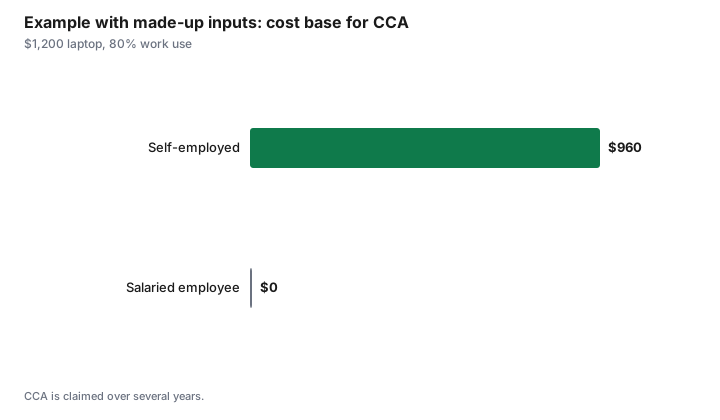
These numbers are an example with made-up inputs, not tax advice. Both buy a $1,200 laptop used 80% for work.
| Worker | Can deduct the purchase? | Business-use cost base for CCA |
|---|---|---|
| Salaried employee | No | $0 |
| Self-employed | Through CCA over time | $960 |
Sources
- CRA, Line 22900 Other employment expenses and T4044 Employment Expenses, as of 1 Oct 2026. Employees cannot deduct the cost or CCA of a computer; commission employees may deduct a reasonable portion of lease costs.
- CRA, Home office expenses for employees: expenses you can claim (detailed method, T2200), as of 1 Oct 2026.
- CRA, capital cost allowance classes, as of 1 Oct 2026. Class 50 for general-purpose computer hardware.
- CRA, Expenses you can claim: home office expenses for employees, and eligibility criteria for the detailed method, as of 1 Oct 2026. Includes home internet access fees; ink cartridges and stationery; lease (not purchase) of computers for commission employees; Form T777.
- The amounts in the example table and chart are made-up inputs.
Frequently asked questions
Can employees deduct a laptop in Canada?
Generally no. CRA does not allow employees to deduct the purchase price or capital cost allowance of a computer, even with a T2200.
Can I deduct a monitor for working from home?
Not as an employee. A monitor is a capital item. Self-employed people can claim CCA on the business-use portion.
What can commission employees deduct?
A reasonable portion of the cost to lease a computer used for work, with a T2200.
What home office expenses can employees claim?
With a signed T2200, eligible expenses under the detailed method, such as a share of utilities and rent and some supplies. Check CRA's list.
How do self-employed people deduct a computer?
Through capital cost allowance, generally Class 50, for the business-use portion.
Can employees claim home internet costs?
Yes, under the detailed method, employees who qualify and have a signed T2200 can claim a reasonable share of monthly home internet access fees.
Can I still use the flat rate method for home office expenses?
No. The temporary flat rate method applied only to 2020, 2021 and 2022. Use the detailed method with a signed T2200.
What form do I use to claim employment expenses?
Form T777, Statement of Employment Expenses, with the amount on line 22900. You also need a signed T2200 from your employer.
Can I deduct software for work as an employee?
Generally not, unless it is a supply consumed directly in your work or your employer requires it under conditions CRA accepts. Check CRA's list and your T2200.
Researched and drafted with AI assistance and fact-checked against official Canadian sources. How we create content.
Disclosure: No products or services are named or ranked. Saving Optimizer may earn a commission if a partner link is added later; no partnership is claimed. Education only. This is not tax advice; check CRA guidance or a tax professional.