
Subscriptions · Canada
Cancel Adobe Creative Cloud in Canada: Annual Plans, Early Fees, and Alternatives
The painful Adobe bill is usually an annual plan that looks monthly. You pay every month, then a cancel in month five produces a fee equal to half the payments still left on the commitment. Adobe’s own subscription-terms page, updated 17 April 2026, is the rule. The fee is not a surprise if you read the plan type first. It is a surprise if the credit-card line was the only thing you read.
List prices on adobe.com/ca move, and your renewal price can differ from the public page. This guide does not invent a Canadian sticker price. It uses Adobe’s fee rule and a labelled example so you can check the number on your account. A trial that has not converted yet is the trial checklist. The renewal belongs on the subscription sheet.
Disclosure: Creative-software alternatives are an offer type. Saving Optimizer may earn a commission if we later add a partner link. We do not currently claim an Adobe, Affinity, or other software partnership. Education only. The fee on your Adobe confirmation screen is the fee.
Key takeaways
- Three individual plan shapes: month-to-month with no annual commitment, annual billed monthly, and annual prepaid. The fee depends on which one you have.
- Adobe’s terms help, updated 17 Apr 2026: a full refund if you cancel within 14 days of the initial purchase for most plans. After that, an annual plan billed monthly can be charged 50 percent of the remaining contract balance. Prepaid annual is non-refundable and runs to the end of the term. Month-to-month has no early-termination percentage. It runs to the end of the month.
- Cancel in the Adobe account that pays, unless Apple, Google, or a reseller billed you. After cancel, free membership storage is 5 GB. You have 30 days to get under that limit if you are over.
- Export files and presets before access ends. A single-app plan, the Photography plan, or true month-to-month is the cheaper path when you do not need every app all year.
- If you stay annual, calendar the renewal 30 days out. Adobe says the price is fixed during the term and can change at renewal, with notice.
Identify your plan type: month-to-month vs annual billed monthly vs prepaid
Sign in at the Adobe account that receives the invoices and open the plan details before you cancel. You need the plan name and the billing sentence. There are three shapes that matter for an individual in Canada.
- Month-to-month, no annual commitment. You can stop renewal. You do not owe a percentage of a year you never promised. You also pay more per month than the annual options, which is why the annual button is the one on the marketing page.
- Annual, billed monthly. The credit card charge is monthly. The contract is a year. This is the plan that produces the early-termination fee in the next section.
- Annual, prepaid. You already paid for the term. Cancelling does not hand that money back after the refund window. Service continues until the term ends, and the decision that saves money is turning off the next renewal.
Write the shape in the subscription sheet. “Adobe, about sixty dollars” is not a plan type. If the account page and the email disagree, believe the account page and save a screenshot. Students and teachers, teams, and enterprise plans have their own terms. This page is the individual Creative Cloud case Adobe describes on the subscription-terms help page. A plan bought through a school bookstore or an employer is not this cancel button.
14-day windows vs 50 percent remaining-balance early termination on annual billed monthly
Adobe’s help page “Understand Adobe’s subscription terms and refund policies,” updated 17 April 2026 and used 24 Sep 2026, answers the fee in its own words. For most plans you get a full refund if you cancel within 14 days of the initial purchase. A trial is different and earlier: the subscription begins when the trial ends unless you cancel before the trial ends, and you are charged the rate shown on the day you started the trial. Cancel the trial before it ends if you do not want that charge. The 14-day refund clock is tied to the initial purchase, not to every renewal.
After 14 days, if you bought from Adobe, the same page says payment is non-refundable and a cancellation fee may apply. The three outcomes it spells out:
- Annual, billed monthly: a cancellation fee of 50 percent of the remaining balance of your contract obligation may apply. Service continues until the end of that month’s billing period.
- Annual, prepaid: the payment is non-refundable, and service continues until the end of the contracted term.
- Monthly, no annual commitment: the payment is non-refundable, and service continues until the end of that month. There is no 50 percent fee, because there is no remaining annual balance.
If you bought through a reseller or a mobile app store, that seller’s terms apply, not this 50 percent sentence. Check Apple or Google if the receipt is from them. The trial checklist shows those cancel paths.
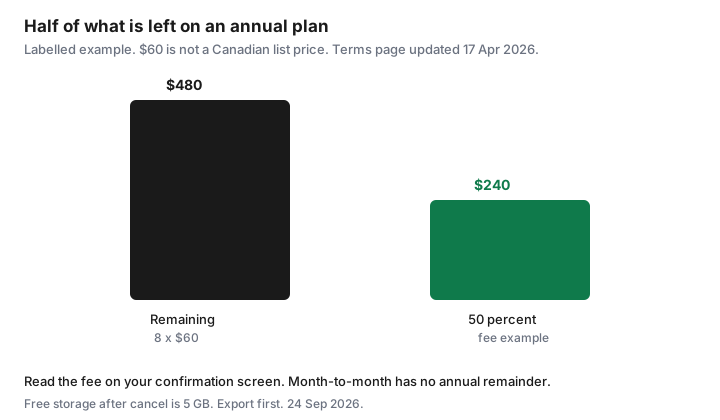
Labelled fee, not your invoice. Suppose the account shows $60 a month on an annual plan billed monthly, and eight monthly obligations remain. The remaining balance is 8 × $60 = $480. Fifty percent is $240. You would still have access until the end of the current month, and you would pay the fee Adobe displays when you confirm. If only two months remain, the same 50 percent rule is 50 percent of 2 × $60, or $60. Sometimes finishing the term costs less than the fee plus the loss of access. Do that arithmetic with the price and the months on your screen. Adobe’s public pages show different prices by country. A third-party tracker is not your bill. The confirmation screen is.
| Plan | Within 14 days of initial purchase | After 14 days |
|---|---|---|
| Annual, billed monthly | Full refund for most plans | Fee of 50 percent of the remaining contract balance may apply. Access until the end of that month. |
| Annual, prepaid | Full refund for most plans | Non-refundable. Access until the end of the term. Turn off the next renewal. |
| Month-to-month | Full refund for most plans | Non-refundable for the current month. Access until month end. No annual remainder. |
How to cancel in Adobe account and what happens to cloud files (5GB free limit)
Cancel while signed into the Adobe ID that pays. The accounts page is where Manage plan and Cancel live. Screenshot the fee Adobe shows before you confirm, and save the email that follows. If the button is missing, the biller may be Apple, Google, or a reseller. Cancelling in the wrong account does nothing to the charge.
Adobe’s page “Account access after plan cancellation,” updated 12 May 2026, says access to paid apps and services ends when the current billing period finishes, and the Adobe account stays active as a free membership. Cloud storage drops to 5 GB. If you are over that limit you have 30 days to reduce what is stored online. After 30 days you could lose access to some or all of the files on Creative Cloud servers. Files in free storage can later be deleted after inactivity, with an email before that deletion. Thirty days is the working window. It is not a second year of the paid plan.
Export checklist before you lose app access
Do this before you confirm the cancel, not during the last weekend of the 30 days. Paid apps may already be closed by then, depending on the billing date.
- Copy cloud documents to a drive you control: photos, Photoshop and Illustrator files, Premiere projects and the media they link, InDesign packages, PDFs.
- Export Lightroom catalogs and make sure the original photos are on a disk, not only in the cloud album. Presets and brushes export with the catalog workflow Adobe documents for your version.
- Download font files you are allowed to keep. Adobe Fonts activation is a membership feature. Do not assume a client project will open next year with the same font live.
- Export Libraries and brand kits if a client’s colours and logos live there.
- Sign out of shared reviews only after the other person has their copy.
- Confirm the local copies open on a computer that is not signed into the paid apps, or that will not be, once the period ends.
Then look at storage used. If it is over 5 GB, delete or move the rest inside the 30 days Adobe states. A portable drive is enough. You do not need another subscription to hold a folder of working files.
Cheaper paths: single-app, Photography plan, or month-to-month if usage is bursty
All-apps all year is the expensive default for someone who uses Photoshop in March and nothing in July. Before the renewal, price three narrower options on your account page, in CAD, tax included. A single-app plan when one program does the work. The Photography plan when the work is Photoshop and Lightroom. Month-to-month, no annual commitment, when the work arrives in bursts: a wedding season, a one-off report, a course that ends. Month-to-month costs more per month and avoids the 50 percent remainder if you cancel after the 14-day window. That trade is worth it when you know you will not need the apps for a full year.
Adobe’s plan-change help says prices vary by country and tells you to review pricing in your account. Use those numbers. A headline in US dollars on a comparison chart is not a Canadian invoice. Switching plans can be cheaper than cancelling and paying the fee, if the switch is allowed on your plan and the new price for the rest of the term is lower than the fee plus a later rejoin. Read the change screen. If it shows a fee anyway, you are not saving. Creative alternatives, such as another photo editor, are reasonable when you have exported your files and you do not need Adobe-specific client workflows. They are a choice after the export, not a banner in the middle of a deadline. This page does not rank them.
Calendar the renewal 30 days out if you must stay annual
Adobe’s terms help says the price stays fixed during the subscription period and can change at renewal, with notice beforehand. Thirty days gives you time to export, to compare a single-app or Photography plan, or to switch a bursty year onto month-to-month before the next annual term starts. Seven days is enough for a streaming trial. It is tight for a catalog of photos. Put the Adobe event 30 days before the renewal date on the same shared calendar as the other household renewals.
If you stay, you are choosing the annual commitment with your eyes open, including the 50 percent rule if you leave mid-term next year. Write the plan type next to the event so future you does not rediscover it from a credit-card line. If you leave, the confirmation email goes in the same folder as the export checklist. Then check the card on the next statement. A charge after the confirmed end is a support ticket with that email attached, not a new subscription.
Sources & date stamps
- Adobe Help, “Understand Adobe’s subscription terms and refund policies,” updated 17 Apr 2026, used 24 Sep 2026: 14-day full refund for most plans; 50 percent of the remaining balance on an annual plan billed monthly; prepaid annual non-refundable; month-to-month runs to the end of the month; trials charge unless cancelled before they end; reseller and app-store purchases follow those sellers’ terms.
- Adobe Help, “Account access after plan cancellation,” updated 12 May 2026, used 24 Sep 2026: paid apps end when the billing period finishes; free membership storage is 5 GB; 30 days to reduce storage if you are over the limit.
- The $60 × 8 months = $480, fee $240 example is labelled arithmetic on that 50 percent rule. It is not a Canadian list price and not your invoice.
Frequently asked questions
I pay Adobe every month. Can they still charge a cancel fee?
Yes, if the plan is annual billed monthly. Adobe’s terms page updated 17 Apr 2026 says the fee may be 50 percent of the remaining contract balance. A true month-to-month plan does not have that remainder. Read the plan type on the account.
Is the 14-day refund available every year?
The page ties the full refund to 14 days from the initial purchase for most plans. A renewal is not described as a fresh 14-day window. Check the screen you are looking at, and cancel a trial before it ends if you have not been charged yet.
What happens to my files?
The account stays. Storage becomes 5 GB on the free membership, per Adobe’s cancellation-access page updated 12 May 2026. You have 30 days to get under 5 GB if you are over. Export the working files before paid apps stop.
I bought Adobe through the App Store. Where is the fee?
Adobe says a purchase through a mobile app store or a reseller follows that seller’s terms. Cancel in Apple or Google if they billed you. The 50 percent sentence is for plans bought from Adobe.
Should I switch to month-to-month?
When you only need the apps for a season, month-to-month avoids an annual remainder. It costs more each month. Compare the account’s month-to-month price for the months you will work with the annual price plus a possible 50 percent fee if you leave early.