
Technology · Canada
Free Parental Controls on Phones and Tablets

Before paying for a parental control app, try the free tools on your kids' devices. Apple's Screen Time and Google Family Link let you set time limits, filter content and approve downloads and purchases. Your internet provider or router may add filters for the whole home. Pair the tools with a talk about the rules.
Key takeaways
- iPhone and iPad: Screen Time with Family Sharing, free.
- Android: Google Family Link, free.
- Many internet providers and routers offer free filters and schedules.
- Set purchase approvals so kids can't buy apps without asking.
- Get Cyber Safe has a free checklist to go through with kids (checked 24 Nov 2026).
Built-in tools
| Tool | Devices | What it does |
|---|---|---|
| Screen Time with Family Sharing | iPhone, iPad, Mac | Time limits, content limits, purchase approvals, communication limits |
| Google Family Link | Android phones and tablets, Chromebooks | Time limits, app approvals, content filters, location |
| Internet provider or router tools | Every device on your Wi-Fi | Website filters, Wi-Fi schedules |
Setting it up
- Create a child account in Family Sharing or Family Link.
- Set daily time limits and downtime at night.
- Turn on purchase approvals.
- Set content ratings by age.
- Check your router app for Wi-Fi schedules.
Talking with kids, and an example saving
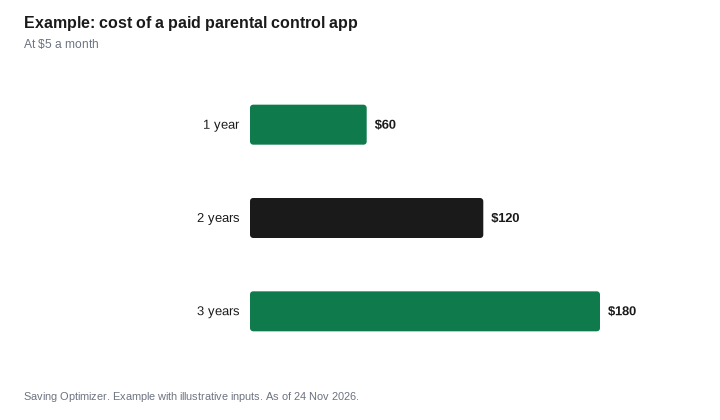
Explain the rules and review them as kids grow. Example: if you skip a paid app at $5 a month, you save $60 a year, or $180 over three years.
See a kid's first phone and kids' app subscriptions.
Sources
- Apple Support (CA), Explore parental controls on your kid's device, checked 24 Nov 2026.
- Get Cyber Safe (Government of Canada), Keep the kids in your life cyber safe: a checklist, checked 24 Nov 2026.
- MediaSmarts, Using Parental Controls tip sheet, checked 24 Nov 2026.
Frequently asked questions
Are there free parental controls for iPhone?
Yes. Screen Time with Family Sharing is built in and free.
Are there free parental controls for Android?
Yes. Google Family Link is free.
Can I control Wi-Fi for the whole house?
Many internet providers and routers offer filters and schedules.
Do I need a paid parental control app?
Usually not. Try the free tools first.
How do I stop kids buying apps?
Turn on purchase approvals in Family Sharing or Family Link.
Researched and drafted with AI assistance and fact-checked against official Canadian sources. How we create content.
Note: App cost is an example. Education only.