
Subscriptions · Canada
Kids App Subscriptions in Canada: Audit, Cap Spend, and Cancel Cleanly
A learning app is an easy yes in September and a quiet renewal in March. The charge is on the parent’s Apple or Google account, the child has stopped opening the app, and a trial that started as “free for a week” is now a row beside Netflix. The fix is an audit of every child renewal, purchase approval before the next trial, and a monthly cap the adults agree on. Two paid apps, one for reading and one for math, is the ceiling. School and the library come first, at no extra charge.
The phone-store cancel steps overlap the trial checklist. The full household pass, including the card and PayPal, is the subscription audit. YouTube in particular is the Premium Family guide, not another learning app. This page is the kids’ app stack.
Disclosure: This guide has no natural affiliate offer. Saving Optimizer does not sell learning apps and does not claim an Apple, Google, or education-app partnership. Education only. A school login is not a product we rank.
Key takeaways
- List every renewal on the Apple Account and the Google Account that pays, including trials. Deleting the app does not cancel either store.
- Apple’s Canadian cancel page, published 14 Sep 2026, says to cancel a trial at least 24 hours before it ends. Ask to Buy, once Family Sharing purchase sharing is on, makes the child request approval.
- Google Play’s help says uninstalling does not cancel, and that you keep access until the end of the time you already paid. Family Link purchase approvals are the Android equivalent of a gate.
- Keep at most one paid literacy app and one paid math app. Entertainment apps are a different budget, or they go.
- Ask the school and the public library what is already free with a student login or a card before you pay.
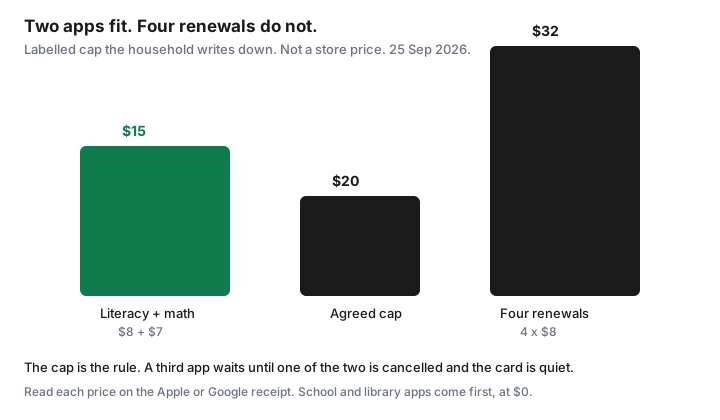
- Write a monthly cap. A labelled $20 cap holds an $8 app and a $7 app. Four $8 renewals are $32, which is over the cap by $12.
List every child app on Apple/Google that auto-renews
Sit down with the devices the children actually use. On iPhone or iPad, open Settings, tap the name at the top, then Subscriptions. Apple’s cancel guide, published 14 Sep 2026 on the Canadian support site, is that path. On a Mac, the same list is in the App Store under the account name, then Subscriptions. You are collecting every row that renews: the app name, the price in CAD, the next date, and whose Apple Account is billed. A family member’s account on the receipt is a subscription you cannot cancel from your phone. Apple says the person named on the receipt has to cancel it.
On Android, sign in to the Google Account that pays and open subscriptions in Google Play, on the web at the Play subscriptions page or in the Play Store app under Payments and subscriptions. Google’s help says a subscription charges at the start of each cycle until you unsubscribe, and that uninstalling the app does not cancel it. If a tablet is signed into a different Google Account than the parent’s, check that account too. A “kids” profile that can buy with its own card is how a trial hides from the audit.
Write the list on the household subscription sheet. Include anything with “trial,” “premium,” or “family” in the name. Then mark the last time someone opened it. No opens in 30 days is a cancel, not a maybe. The statement hunt catches the rows you missed because the descriptor does not say the app’s brand name.
Ask to Buy / purchase approvals to stop surprise trials
A trial is a purchase with the price delayed. The gate has to sit in front of the download, not after the email. On Apple, Family Sharing’s purchase sharing is what lets the organizer pay, and Ask to Buy is what makes a child request approval for an eligible purchase or download, including in-app purchases. Apple’s Family Sharing page for Canada describes that approval. Turn it on for each child account. Apple also notes that, depending on age and country, Ask to Buy may already be required and may not be something you can switch off for a younger child. Check the child’s name in the Family list rather than assuming. A redemption code and a re-download can behave differently from a new purchase. Read the prompt. Do not approve a request you did not expect just because it is small.
On Google, the parent’s control is in Family Link for that child: require approval before a Play purchase or download. A test that matters: the child should not be able to start a free trial that needs a payment method without an adult seeing it. If the tablet is signed into the parent’s Google Account with no child profile, Family Link is not in the path. Make a child account. The card on the parent account is too easy to reach from a shared tablet.
One trial at a time, the rule from the trial checklist. Screenshot the price, the end date, and the biller on day zero. Apple says cancel at least 24 hours before a trial ends if you do not want it to renew. Put that 24 hours on the calendar when the child asks, not the night before.
Education claims vs entertainment—keep one literacy and one math max
Most “learning” apps are a mix of practice and a reward loop. The household does not need four of them. Pick at most one app whose job is reading or spelling, and at most one whose job is math. Everything else that is cartoons, dress-up, or an endless game with a school-shaped icon is entertainment. Entertainment can be lovely. It does not get a permanent renewal beside the literacy app. It waits for a weekend download you already own, or it comes out of a fun budget you can see.
Judge the two keepers by the last two weeks, not by the store description. Did a child use it without being asked, for more than a novelty evening? Does a teacher’s suggestion match it, or was the suggestion a different product the school already licences? If you cannot tell literacy from a sticker book, cancel and ask the teacher what the class uses. You are allowed to keep zero paid apps. The cap below is a maximum, not a target.
Free school-provided and library apps before paid
Before the $8 charge, ask two institutions you already fund. The school: many Canadian boards give students a login for reading, math, or a video library, and a parent subscription duplicates it. The name differs by board and by grade. Email the teacher or check the student portal before you pay. A duplicate login on a parent card is not “supporting learning.” It is paying twice.
The public library: a card is enough for Libby and for whatever kids’ services your branch buys. Do not assume every city has the same app. Ottawa Public Library’s Kanopy page, relevant to the streaming guide, shows how local a “free” digital service is. For apps, look at the library’s kids page and the school’s list, then delete the paid trial that copies them. A free app with ads can still be the wrong choice if the ads are the product. Prefer the school or library login when it exists. Prefer nothing when the child is not asking.
Cancel paths and what happens to saved progress
Cancel in the store that bills you, on the account named on the receipt. Apple: Settings, your name, Subscriptions, the app, Cancel Subscription. If there is no cancel button, or you see an expiry note, Apple says it is already cancelled. Google Play: Manage, then Cancel subscription, on the Play subscriptions page while signed into the paying account. You keep using a Google Play subscription until the end of the period you already paid. Google’s own example is a yearly plan cancelled mid-year: access continues to the end date, and the next year does not bill. Apple trials need that 24-hour margin. Neither store refunds a renewal you simply forgot, except under that store’s refund rules. Ask if you are inside a window they publish. Do not count on it.
Progress is the developer’s account, not a feature of the cancel button. Often the login still exists and a later resubscribe restores the child to the same place. Often a level, a streak, or a class roster lives on the company’s server and you cannot export it. Before the period ends, screenshot the progress a child cares about, and write down the login. If the app offers a download or a parent export, do it while the subscription is still active. Do not buy another month only to avoid a lost streak. A streak is the renewal’s favourite argument. You can start again.
If the receipt is from neither Apple nor Google, the app’s own site is the cancel, and the stores will not show the row. Search email for the app name. That is the same “who billed you” step as the trial checklist.
Monthly kids digital budget cap the household agrees on
Agree a number in dollars, out loud, and write it on the sheet. A labelled cap of $20 a month is enough to show the shape. It is not a recommendation that $20 is correct for your household. Inside it, an $8 literacy app and a $7 math app total $15, with $5 of room that you do not have to spend. Four entertainment renewals at $8 are $32, which is $12 over the cap. The overage is the cancel list, starting with the app nobody opened.
| What you keep | Amount | Against a $20 cap |
|---|---|---|
| One literacy + one math | $8 + $7 = $15 | Under the cap. Room is not a reason to add a third app. |
| Those two, plus a $6 game | $21 | Over. The game waits, or one learning app is paused. |
| Four renewals at $8 | $32 | $12 over. Cancel down to the two that were used in the last 30 days, or to zero. |
Review the cap on the same quarterly date as the rest of the subscriptions. A new school year is when the stack grows. A report card is not a reason to add an app the same evening. If you raise the cap, write the new number down. A cap nobody can remember is a wish.
Sources & date stamps
- Apple Support (CA), “Cancel a subscription from Apple,” published 14 Sep 2026: Settings, your name, Subscriptions; cancel a trial at least 24 hours before it ends; the account on the receipt is the account that can cancel; deleting is not the method the page describes.
- Apple Support (CA), Family Sharing purchases: the organizer can require children to request approval for purchases and downloads. Ask to Buy is that control. Age rules vary by country.
- Google Play Help, “Cancel, pause, or change a subscription on Google Play,” used 25 Sep 2026: uninstalling does not cancel; access continues through the time already paid; cancel on the Play subscriptions page of the paying account.
- The $20, $15, and $32 figures are a labelled household cap. They are not app store prices.
Frequently asked questions
Does deleting the app cancel it?
No. Apple’s cancel page, published 14 Sep 2026, sends you to Settings, your name, Subscriptions. Google Play’s help says uninstalling does not cancel. Cancel on the account named on the receipt.
How do I stop a child starting a trial?
On Apple, Ask to Buy with Family Sharing makes the child request approval. On Google, Family Link purchase approvals do the same job for Play billing. Screenshot the trial end date the day you approve, and cancel at least 24 hours early on Apple.
How many learning apps should we pay for?
At most one literacy app and one math app that a child actually used in the last two weeks. Entertainment apps are a different budget. School and library logins come before either paid app.
Will my child lose their progress?
Often the login remains and a later subscription restores it. That is not a promise. Screenshot progress you care about before the paid period ends. Do not buy another month to save a streak.
What is a sensible monthly cap?
A number the adults write down. The labelled example is $20, which holds an $8 app and a $7 app and does not hold four $8 renewals. Use your receipts, not the example.