
Subscriptions · Canada
Netflix Canada Plans Explained: Ads, Extra Members, Pause, and When to Cancel
Premium becomes the household default because someone wanted 4K once, and the plan never came back down. Ads would have covered weeknights. A quiet month would have cost nothing if the membership had been paused or cancelled. Netflix’s own Canada homepage, read from the page source on 25 Sep 2026, lists three prices before tax: $7.99, $18.99, and $23.99. The FAQ line on that page says plans range from $7.99 to $23.99 a month, pre-tax, and that you can cancel online with no cancellation fee.
Which button is which comes from Netflix’s plans help, used the same day. The help article’s dollar table is labelled US Dollar. Do not copy those US figures onto a Canadian bill. Use the three CAD prices from netflix.com/ca, and the feature rows below. Rotation, if Netflix is one logo among several, is the streaming rotation guide. Choosing internet-only versus a TV package is the Ignite comparison, not this page.
Disclosure: Streaming gift cards are an offer type. Saving Optimizer may earn a commission if we later add a partner link. We do not currently claim a Netflix or gift-card partnership. Education only. Confirm the tier on your account the week you change it. Tax is extra where checkout adds it.
Key takeaways
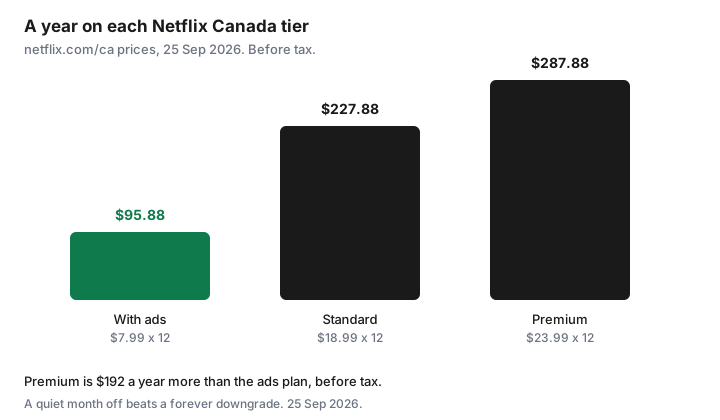
- netflix.com/ca page source, 25 Sep 2026: $7.99 (with ads), $18.99 (no ads), and $23.99 (no ads), before tax. A year of Premium is $287.88 before tax. A year of Standard with ads is $95.88.
- Help Centre features: Standard with ads is 2 streams, 1080p, downloads on 2 devices. Standard matches that picture quality and adds 1 extra member. Premium is 4 streams, 4K with HDR, downloads on 6, and up to 2 extra members.
- Extra members are people outside your household. They are not available on the ad-supported plan. The US help table’s extra-member prices are US dollars. Read the CAD amount on the Canadian add screen.
- Pause, where the payment method allows it, is one month at a time, up to three months, and then billing resumes. Cancel if you have not decided to come back.
- Cancel on the web account. Signing out does not cancel. A partner package is cancelled with the partner.
Compare Standard with Ads vs Standard vs Premium on CAD price, streams, and downloads
The $7.99 plan is the one with ads. Netflix’s plans help says it includes most movies and shows, with a lock on some titles, two devices at a time, 1080p, and downloads on two devices. Standard at $18.99 drops the ads, keeps two devices, 1080p, and downloads on two devices, and adds the option of one extra member who does not live with you. Premium at $23.99 is four devices, 4K with HDR, downloads on six devices, spatial audio, and up to two extra members. The Basic plan is discontinued. If an old account still shows Basic, the help article says you can change plans. Do not assume Basic is still for sale.
Before tax, a year on each tier is 12 × $7.99 = $95.88, 12 × $18.99 = $227.88, and 12 × $23.99 = $287.88. Premium costs $192 more than Standard with ads over a year, and $60 more than Standard. That $60 is the 4K, the extra streams, and the second extra-member slot. If the household watches on one television, in the evening, Standard or Standard with ads is the plan. Premium is the plan when two rooms actually play at once in 4K, often enough that you would notice a downgrade. Tax sits on top. The account total is the bill.
| Plan | CAD a month | Streams and picture | Downloads | Extra members |
|---|---|---|---|---|
| Standard with ads | $7.99 | 2 devices, up to 1080p. Some titles locked. | 2 devices | Not offered |
| Standard | $18.99 | 2 devices, up to 1080p, no ads | 2 devices | 1, outside the household |
| Premium | $23.99 | 4 devices, up to 4K with HDR, spatial audio | 6 devices | Up to 2 |
Extra Member add-ons vs sharing rules—what Netflix actually allows in Canada
Netflix’s sharing help says you may not share the account outside your household. A household is the devices at the main home where you watch. Someone who does not live there needs their own account, or an extra-member slot the owner pays for. The slot is available on Standard (one) and Premium (up to two). It is not available on the ad-supported plan. Extra members need to be in the same country as the owner, they get their own sign-in, and the owner pays. A profile transfer can move watch history. That is the allowed version of “my sister uses it.”
The plans help page prints extra-member prices under a heading that says Pricing (US Dollar): $7.99 with ads or $9.99 without, on the US tiers. Those are not automatically the Canadian add-on. When you add a slot, read the CAD figure on that screen and write it next to the plan price. An extra member on top of Premium can erase the reason you thought Premium was “only five dollars more.” Packages and some third-party billing cannot add extra members, or they bill the slot separately. If Netflix is inside a Rogers or other partner package, the help article says to check whether that package allows extra members. The slot is not free just because the plan was included.
How to pause vs cancel and what happens at the end of the billing period
Netflix’s cancel help, used 25 Sep 2026, offers pause from the cancel page when the payment method qualifies. Pause is not on every account. The help text says it is not available on the discontinued Basic plan, and it is not available for some payment methods, including direct debit, gift cards, and some partner payments. If you pause, you can keep watching until the next billing date. On that date you are not charged, and the membership pauses for one month. You cannot stream or download while it is paused. You can still browse and add to My List. A week before it would resume, you can extend the pause. The cap is three months total. Then the current plan price is charged and watching resumes, unless you cancel during the pause.
Unpause charges you immediately and resets the billing date. Use that only when someone is ready to watch tonight. If the quiet stretch might run longer than three months, cancel instead. Pause is a decision to return. Cancel is a decision to stop. Either way, access you already paid for runs to the end of the current period. You do not get a refund of the days left, and Netflix’s Canada FAQ says there is no cancellation fee. The rotation guide notes that Netflix keeps viewing activity so a rejoin still looks like your account. Change the password if you do not want someone else in the house to restart it.
When rotating off Netflix for a month beats downgrading forever
Downgrading Premium to Standard with ads saves $16 a month, every month, and you live with ads and two streams all year. That is the right move if Premium’s extra streams are imaginary. It is the wrong move if the only problem is a month when nobody is watching. That month costs $23.99 before tax if you stay on Premium, and $0 if you cancel or pause. One dark month on Premium is more than the $16 you would save by downgrading for that same month, and you can come back to Premium when the show returns. Permanent downgrade is for a household that has decided 4K and four streams are not the product. A month off is for a household that still wants Premium in the months it watches.
Do the same test on Standard. A month you will not open the app is $18.99 you do not have to spend. The rotation rule is one always-on service and one slot. If Netflix is the always-on, it stays, on the cheapest tier that matches how you watch. If it is the slot, it leaves when the title is finished. Library apps cover the gap. They are not a second subscription.
Cancel path: Account then Manage membership—and when a payment partner blocks in-app cancel
Use a browser. Open Account, then the membership or plan controls, and cancel there. Netflix’s help says this is the cancel, and that signing out or deleting the app does not end the membership. A confirmation email follows. Save it. If the account page says a package or a partner is the biller, the cancel control is with that partner. Cancelling inside Netflix will not remove a line on a Rogers, Bell, or similar bill. The reverse is also true: dropping the package can turn Netflix’s own card back on if you linked an existing account and did not cancel it. Read who pays before you click. Write it on the sheet.
Gift-card balances and some partner payments also block pause. If you do not see Pause for 1 Month, do not hunt for a secret toggle. Cancel, or change the payment method only if you have already decided to keep the plan and you want pause next time. Then check the card, or the partner bill, on the next cycle.
Stack with household rotation so Netflix is not your default forever plan
Name the always-on service in the house. If it is Netflix, write the tier next to it: “Standard with ads, $7.99, because we watch on one TV.” If it is not Netflix, Netflix is a visitor. Join for the title, cancel when the title is done, and do not let Premium survive out of habit. Three paid streamers at once are capped at 60 days on the rotation guide. Netflix plus a full-year Disney+ and a full-year Crave is the stack that page is trying to break.
Prime Video is not free. It comes with Prime, and Prime’s fee page used 24 Sep 2026 lists $9.99 a month or $99 a year, plus tax. Count Prime Video as a paid streamer only if video is why you keep Prime. Shipping math is the Prime guide. Calendar Netflix’s billing date seven days early, with the tier in the event title, so a price change email is a decision instead of a shrug.
Sources & date stamps
- netflix.com/ca page source, used 25 Sep 2026: plan prices $7.99, $18.99, and $23.99. FAQ text: plans range from $7.99 to $23.99 a month pre-tax. No cancellation fee. Cancel online.
- Netflix Help Centre, Plans and Pricing, and Extra Members / Sharing, used 25 Sep 2026: streams, downloads, picture quality, and extra-member eligibility described above. The price table on that plans article is labelled US Dollar and is not used as the Canadian price.
- Netflix Help Centre, How to cancel, used 25 Sep 2026: pause for one month where offered, extend up to three months, then billing resumes. Some payment methods cannot pause. Signing out does not cancel. Partner billing is cancelled with the partner.
- Year figures are 12 × those CAD prices, before tax. Amazon Prime $9.99 or $99 is from Amazon’s fee page used 24 Sep 2026 on the Prime guide. Adobe’s 50 percent early fee and GoodLife’s notice rules are on their own guides, not Netflix rules.
Frequently asked questions
How much is Netflix in Canada?
On 25 Sep 2026 the netflix.com/ca page source listed $7.99, $18.99, and $23.99 a month before tax. The on-page FAQ says plans range from $7.99 to $23.99. Tax may be added. Read your account before you change tiers.
Can I share Netflix with someone who does not live here?
Netflix says the account stays in the household. Standard can add one extra member, and Premium up to two. The ad-supported plan cannot. The US help page prints extra-member prices in US dollars. Use the CAD amount on the Canadian screen.
What is the difference between pause and cancel?
Pause, if your payment method allows it, stops the next charge for one month and can be extended up to three months, then billing starts again. Cancel stops the membership at the end of the period you already paid. Pause is for a return you have already decided on.
I signed out of the app. Is that cancelled?
No. Netflix says signing out or deleting the app does not cancel. Use Account in a browser. If a partner bills you, cancel with the partner.
Should I drop to the ads plan forever?
If you never use the extra streams or 4K, yes. If you simply are not watching this month, a month off saves the whole tier price and you can return. Downgrading forever is a different decision from rotating off for a quiet month.