
Subscriptions · Canada
Nintendo Switch Online Family Membership in Canada: Seats, Expansion Pack, Cancel
A Family membership looks generous because it covers eight Nintendo Accounts. Most households are not eight players. They are one adult who pays and one child who plays Mario Kart online, plus an Expansion Pack added because the classics sounded included. The Canadian prices on Nintendo’s own site make the break-even a two-person test, and the Expansion Pack a second test you only pass if someone actually opens those games. Auto-renew is annual. Miss the anniversary and you buy another quiet year.
Prepaid Nintendo eShop funds are an offer type at the end of this page, not a reason to leave a card on the membership. The renewal itself belongs on the subscription sheet. A free-trial conversion is the trial checklist, including Apple’s 24-hour rule if a code or a membership was bought through a different store.
Disclosure: Nintendo eShop gift card types are an offer type. Saving Optimizer may earn a commission if we later add a partner link. We do not currently claim a Nintendo partnership. Education only. Buy a card only as a planned top-up, not as a second membership.
Key takeaways
- nintendo.com/en-ca, checked 25 Sep 2026: Individual $29.99 a year, Family (up to 8 accounts) $49.99, Expansion Pack Individual $69.99, Expansion Pack Family $109.99.
- Two Individual years cost $59.98. Family at $49.99 wins at two real players and wastes $20 at one player. Eight accounts is $6.25 each. Empty seats do not count.
- Expansion Pack Family is $60 a year more than base Family. Pay it only if someone plays the extra classics or the included add-ons.
- Many first-party games need the membership for online play. A used cartridge played on the couch does not.
- Nintendo Support says turn auto-renewal off at least 48 hours before the membership expires. Once it is off, the help page says it cannot be turned on again. Access runs to the end of the term. There is no refund for the leftover days.
Individual vs Family (up to 8) CAD pricing break-even
The public compare page shows the individual buttons. The overview page on nintendo.com/en-ca, read 25 Sep 2026, prints both shapes. Base Nintendo Switch Online is $29.99 CAD a year for one Nintendo Account and $49.99 CAD a year for a Family membership of up to eight Nintendo Accounts. Expansion Pack is $69.99 for one account and $109.99 for up to eight. The eShop checkout on your account is the amount that renews. If a support article still shows an older table, do not average the two. Use the purchase screen.
| Plan | One account | Family, up to 8 | When Family is cheaper |
|---|---|---|---|
| Nintendo Switch Online | $29.99 / year | $49.99 / year | At two players: two Individual plans are $59.98. Family saves $9.99. At one player, Individual saves $20. |
| With Expansion Pack | $69.99 / year | $109.99 / year | At two players: two Expansion plans are $139.98. Family saves $29.99. At one player, Individual saves $40. |
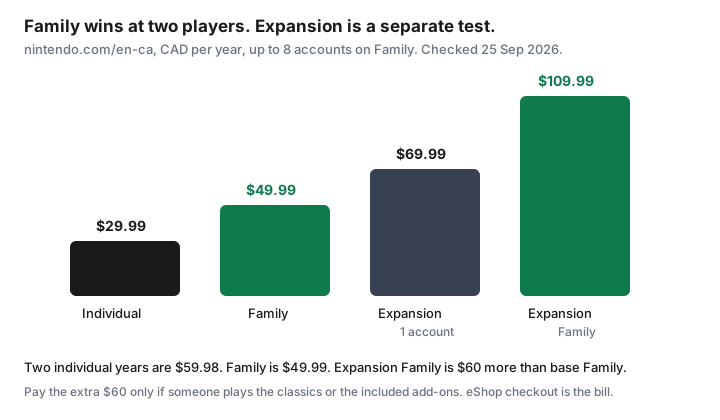
Count Nintendo Accounts that played an online game or a classics app in the last 30 days. A parent account created so the child could have a family group, and never used, is not a second player. At eight real players the base Family price is $6.25 a year each. That is a bargain only if eight people play. The sales line “less than the price of eight individuals” is true and still the wrong comparison for a household of two.
Expansion Pack extras—only if someone plays them
Nintendo’s compare page describes what Expansion Pack adds on top of base membership: more Nintendo Classics libraries, including Game Boy Advance, Nintendo 64, and SEGA Genesis, plus included downloadable content such as the Mario Kart 8 Deluxe Booster Course Pass and Animal Crossing: New Horizons — Happy Home Paradise, and Switch 2 features such as GameCube classics and selected upgrade packs. Base membership already includes online play, save-data cloud on supported games, and the NES, Super NES, and Game Boy classics libraries, plus the offers Nintendo lists there. Read the current compare page before you treat a title as included. Libraries move.
The price of those extras, on the 25 Sep 2026 figures, is $40 a year if you are one account ($69.99 minus $29.99) and $60 a year if you are a Family ($109.99 minus $49.99). Ask who will open them this season. If the answer is “the add-on came with it,” you are paying for a catalogue nobody named. If a child is midway through the Mario Kart booster courses or a household Switch 2 is using the GameCube library, the extra is a real purchase. Upgrade only for that use. Nintendo says you can change membership type and receive a prorated credit for time left on the current plan, through the eShop or Nintendo Account settings. Read the proration screen. A credit that is smaller than you hoped is still the offer. Do not upgrade “for the year” in a month nobody is playing.
Online multiplayer requirement for many first-party games
Local play on one couch is not online play. Many Nintendo games that families already own, Mario Kart and Splatoon among them, require a Nintendo Switch Online membership for online matches with people outside the house. The cartridge or the download you bought does not include that. If the household’s actual use is one online game on Friday, the membership is the price of that online mode, and the classics library is a bonus you should not pay extra for unless someone plays it.
Write the game down. “Online” is not a title. If the only online game is one the children have not launched since the school year started, the membership is a candidate to end at the anniversary, not a candidate for Expansion Pack. Games you play together in the same room, and single-player games, do not need the membership for that session. Cloud save backups on supported games are part of the paid membership. If a child’s progress lives only in the cloud, copy what you can before the term ends. Do not assume a local save exists on every title.
Add/remove family members on Nintendo Account
Nintendo’s Family membership page, read 25 Sep 2026, tells the admin to add people from a browser, not from a guess in the eShop:
- Sign in to the admin Nintendo Account at accounts.nintendo.com.
- Open Family group. You should see the current members.
- Choose Add a member, then invite someone to the family group.
- Enter the email address on that person’s Nintendo Account. They have to accept. Until they accept, they are not a seat you can count in the break-even.
The same Family group screen is where the admin reviews who is still in the group. Remove someone who no longer lives in the house or no longer plays before you use “we have eight” as a reason to keep Expansion Pack. A lapsed invite is not a player. Each person needs their own Nintendo Account. Sharing one login to fake a Family plan breaks the feature and hides who is actually playing. If you bought the membership through a store other than Nintendo, manage renewal where that store says. Nintendo’s in-game subscription help makes the same point: auto-renewal is controlled by the seller that took the payment.
Cancel auto-renew before anniversary
Nintendo Support’s cancel article says you stop the next year by turning automatic renewal off at least 48 hours before the membership expires. The membership stays active until the end of the term. You do not get a refund or credit for the days left. The same article says that once auto-renewal is turned off, it cannot be turned on again. That is a reason to decide on purpose, and a reason to do it more than 48 hours ahead so a weekend does not become another $49.99 or $109.99.
Paths the support article lists: on the Account Home site, sign in at accounts.nintendo.com/portal with the account that purchased the plan, open Nintendo Switch Online, and choose Cancel Your Pass by Turning Off Auto-Renewal under Active Plan, then confirm. On the console, open Nintendo eShop with the purchasing account, open the account icon, and choose the control that turns automatic renewal off. Switch 2 and the Switch family of consoles label that control in slightly different places. Follow the label on your screen. Afterward, the plan should show that it will end, not that it will renew. Screenshot that line.
Put a reminder 14 days before the anniversary, and a second one four days before, on the same calendar as the other renewals. Forty-eight hours is the floor Nintendo prints, not a comfortable target. If you turn it off and later want another year, you buy a new membership. You do not flip the old switch back on. That is fine. A new purchase is a new decision, which is what an annual gaming membership should be.
Used-game households: when physical carts beat online catalogues
A used cartridge of a single-player game, or a local multiplayer game the family still likes, has no annual fee. The online classics catalogue is a rental: it plays while the membership is active and stops when the term ends. If the household’s shelf already covers Friday night, the catalogue is not a second shelf you need to rent. Pay for online play only in seasons when a specific first-party game is actually being played online. Between those seasons, the cartridges are the plan.
Expansion Pack is the catalogue most likely to be bought for games nobody starts. Price it as $40 or $60 a year on top, using the table above, and name the game that justifies it. If you cannot name one, stay on base membership or on no membership. An eShop gift card is useful when you already know you will buy a game or a planned membership term and you do not want a card left on auto-renew. It is a poor substitute for turning auto-renewal off. A card balance can still be spent by a child account if purchase rules are loose. Set those rules in the Nintendo Account parental controls before you add funds. The kids’ app rules on the app-subscription audit are the same instinct on the phone.
Sources & date stamps
- nintendo.com/en-ca/online/, used 25 Sep 2026: Individual $29.99 CAD/year and Family up to 8 accounts $49.99 CAD/year for Nintendo Switch Online; Individual $69.99 and Family $109.99 for Nintendo Switch Online + Expansion Pack.
- nintendo.com/en-ca/online/compare-memberships/, used 25 Sep 2026: what base membership includes versus Expansion Pack, and that a change of plan can be prorated through the eShop or account settings.
- nintendo.com/en-ca family membership page, used 25 Sep 2026: add a member from accounts.nintendo.com, Family group, invite by the email on their Nintendo Account.
- Nintendo Support, “How to Cancel a Nintendo Switch Online Membership or Adjust Auto-Renewal Settings”: turn auto-renewal off at least 48 hours before expiry; access continues to the end of the term; no refund for remaining time; once off, auto-renewal cannot be turned back on.
- The $59.98, $9.99, $20, $60, and $6.25 figures are arithmetic on the 25 Sep 2026 prices. They are not a receipt.
Frequently asked questions
Is Family worth it for one child?
On nintendo.com/en-ca prices checked 25 Sep 2026, Individual is $29.99 a year and Family is $49.99 for up to eight accounts. One player saves $20 on Individual. Family beats two Individual plans, which would be $59.98.
What does the Expansion Pack add in dollars?
Expansion Pack Individual is $69.99 and Family is $109.99. That is $40 more than base for one account and $60 more than base Family. Pay it only if someone plays the extra classics or the included add-ons.
How early do I cancel auto-renew?
Nintendo Support says at least 48 hours before the membership expires. Access continues to the end of the term. There is no refund for the leftover days. Once auto-renewal is off, the help page says it cannot be turned back on. Calendar it 14 days ahead.
Do used games need Switch Online?
Local and single-player play on a cartridge does not. Online play in many first-party games does. If nobody is playing online this season, the membership is a candidate to end at the anniversary.
Can I add a family member without a second membership?
Yes. The admin invites them from accounts.nintendo.com, Family group, using the email on their Nintendo Account. They have to accept before they count as a seat.