
Subscriptions · Canada
YouTube Premium Family in Canada: Ad-Free Kids Viewing Math and Cancel Tips
Families buy YouTube Premium because the ads on a child’s tablet are relentless, then keep a Family plan after only one profile still watches. The Family plan is a seat product: the manager plus up to five other people at the same address, six in total. It is a saving when two or more people actually use it. It is an extra bill when the household is one viewer who wanted the ads gone. The Canadian price has to come from a Canadian Google account. A page loaded in another country will cheerfully show another country’s stickers.
Kids’ paid apps around Premium are the app audit. Cancelling a Play-billed trial is the trial checklist. Library video between subscriptions is the same instinct as the streaming rotation, with Kanopy Kids called out on the kids’ streaming page.
Disclosure: This guide has no natural affiliate offer. Saving Optimizer does not sell YouTube or ad blockers and does not claim a Google partnership. Education only. The CAD price on your Canadian signup is the price.
Key takeaways
- YouTube’s help says a Family plan covers the manager and up to five other household members. They must live at the same address. An electronic check-in runs about every 30 days.
- Do not copy a US price. On 25 Sep 2026 a YouTube Premium page served to a non-Canadian network showed individual $15.99 and family $26.99. Those are not Canadian list prices.
- The last clearly reported Canadian figures we can cite: MobileSyrup, 6 Mar 2025, described the main individual plan at $13.99. Google confirmed to MobileSyrup a Family increase to $22.99 effective November 2022. Your screen may differ. Write it down before you decide.
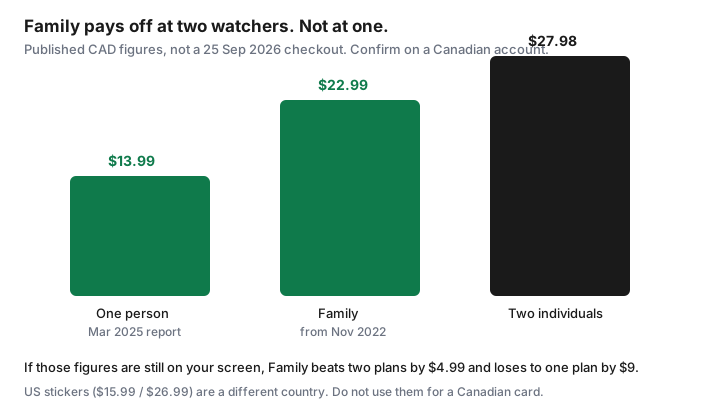
- If those published figures are still what you see, two individual plans are $27.98 and Family at $22.99 wins by $4.99. One watcher overpays by $9 a month.
- Downloads matter only if someone travels or commutes offline. Creator sponsorships inside a kids’ video are not the same thing as YouTube’s ads.
- Cancel where you subscribed: YouTube’s membership page, or Google Play if Play billed you. Uninstalling the app does not cancel.
CAD Family plan price vs living with ads / sponsored kids content
Open YouTube Premium while signed into the Google account that would pay, with the country set to Canada, and write down Individual, Family, and Student if a student in the house qualifies. That screenshot is the price. YouTube’s public pages follow the account and the network. Treating a US sticker as Canadian is how a household “saves” on a plan it cannot buy.
Two published Canadian markers, so you have a scale until your screenshot replaces them. MobileSyrup’s 6 Mar 2025 article on Premium Lite said Canada’s main Premium option cost $13.99. That article was about a cheaper tier that was not in Canada; the $13.99 was the then-current individual comparison, not a Google price-change notice that day. Family is older and firmer: MobileSyrup, 20 Oct 2022, reported that Google confirmed a Canadian Family increase from $17.99 to $22.99, effective in November 2022, for a plan shared by up to six people. Members in 2026 have reported both grandfathered rates and talk of higher ones. If your account still shows $13.99 and $22.99, use the math below. If it shows something else, redo the math with the new pair. Do not blend a 2022 Family price with a 2026 US individual price.
| Who watches | Published-figure cost | Decision |
|---|---|---|
| One person | Individual $13.99, or Family $22.99 | Family costs $9 more. Cancel Family. Keep Individual only if ad-free is worth $13.99 to that one person. |
| Two people | Two individuals $27.98, or Family $22.99 | Family wins by $4.99, if both people use it and pass the address check. |
| Ads instead | $0 | Right when the viewing is short, or when a parent can sit with the child. Sponsored segments inside the video can remain either way. |
Premium removes YouTube’s ads for members. It does not edit a creator’s sponsored segment out of a kids’ video. If the pain is “the video itself is an ad,” Premium will disappoint you, and the better control is what the child is allowed to open. YouTube Kids is a different app, covered next. Living with ads is a real option when viewing is a half hour after school and a parent is in the room. It is a poor option when a tablet autoplays for an hour in the car and nobody is choosing the next video.
YouTube Kids vs Premium features parents actually use
YouTube Kids is the product built for children. Premium is the product that removes ads, adds downloads and background play, and bundles YouTube Music on the full individual and family plans. Parents who buy Premium “for the kids” are usually buying the absence of YouTube’s ad breaks on the main app, or on a profile that is not the Kids app. Check which icon is on the tablet. If it is YouTube Kids, read that app’s own supervision settings and do not assume a Premium receipt changes the Kids app one for one. If it is regular YouTube, Premium’s ad-free playback is the feature you are paying for, and the content filters are a separate parental-control job.
The features adults notice are ad-free playback, downloads, and background play. The feature children notice is that the video starts without a commercial. Music is a bonus if someone already wanted YouTube Music. It is not a reason to keep Family for a household that uses another music source, or none. Student pricing, if a university student in the house qualifies, is an individual product with its own verification. It does not replace a Family plan for younger siblings. YouTube’s help says student memberships are verified and time-limited. Read the current terms before you move a family onto a student account to save money. That move usually breaks the seat count.
Downloads for travel and commuting value test
Downloads are worth money when a commute, a cottage week, or a flight would otherwise burn mobile data or fail without a signal. They are worth nothing if every video is watched at home on Wi-Fi. Test it for the next two trips, or the next ten commutes. Count how many videos someone actually played from downloads. Zero means the download perk is not carrying the subscription. Background play, audio with the screen off, is the commuter’s other reason. If nobody listens that way, say so on the sheet.
A household that wants downloads for one weekend a month can download what it needs and then cancel, as long as the paid period covers the trip. Do not keep Family all year because July might include a drive to a rental. That is the same “in case” reasoning the streaming rotation guide rejects. Data charges on a phone plan are a separate bill. If the only reason for Premium is to avoid mobile data, a download on Wi-Fi the night before, from videos you can play another way, may be enough. Measure it once.
Seat usage: cancel if only one profile watches
YouTube’s Family help says the manager shares with up to five other members, everyone at the same residential address, with a check-in about every 30 days. A cousin across town is not a seat. A profile you created and nobody opens is not a seat. Open the family group and count people who watched in the last 30 days. One person means Individual, or no Premium. Two or more means Family can win, using your screenshot prices, not the chart’s published markers if they have gone stale.
If you upgrade from a long trial to Family, YouTube’s help says a trial longer than a month can be cut to one month, and cancelling Family does not restore the old trial. Do that upgrade only when the seats are real. An annual individual plan, where YouTube offers one, is for someone who has already decided to stay all year. It is the wrong product for a one-month experiment. The rotation guide makes the same point about Disney+ annual pricing.
Cancel in Google account / Play subscriptions
Cancel in the place that bills you. If you subscribed on YouTube’s site or app, open the paid memberships on that Google account and cancel there. If the receipt is from Google Play, use Play subscriptions: sign in to the paying account, Manage, Cancel subscription. Google’s Play help, used 25 Sep 2026, is explicit that uninstalling the app does not cancel, and that you keep access until the end of the period you already paid. YouTube’s own family article is the place to start when you are unsure which of the two billed you. Search email for “YouTube Premium” and read the sender. Apple is a third path if a household subscribed to YouTube through an Apple receipt. Cancel on the Apple Account in that case, using the steps in the trial checklist. The Play page will not show an Apple charge.
Screenshot the end date. A Family plan that says it will renew is not cancelled. A plan that says it ends on a date, with no next charge, is cancelled, and the downloads you care about need to be watched before that date. Then check the card on the following statement, the same way the hidden-charge guide says to check any other biller.
Screen-time alternatives that cost $0 (library media, downloads you own)
Ad-free does not have to mean Premium. A public library card covers a lot of children’s video and audiobooks. Ottawa Public Library’s Kanopy page says Kanopy Kids does not use the film-ticket allowance. Other cities set their own rules. Look up your library before you assume the cap. CBC Gem and other free Canadian players cover some of the “something on” hours. Videos and music you already bought, sitting on a drive or in a purchase library, do not need a new subscription to be replayed in the car if you copied them on Wi-Fi.
The household rule that pairs with this is the kids’ streaming rule: one paid kids service at a time, for a named show, then cancel. Premium is that paid service only in a month when ad-free YouTube is the thing you chose, not the background tax under Disney+ and Netflix as well. If YouTube is the always-on kids screen, price it honestly against one streaming window. Stacking both all year is how a tablet becomes a second cable bill. The kids’ streaming guide is the window. The rotation guide is the adult stack beside it.
Sources & date stamps
- YouTube Help, family plan, including the en-CA page used 25 Sep 2026: manager plus up to five members; same residential address; electronic check-in about every 30 days; the manager is the only buyer.
- YouTube Help, paid membership types: Family is a multi-person plan for up to six people in the household. Student plans have their own verification.
- MobileSyrup, 6 Mar 2025: described Canada’s main YouTube Premium option at $13.99 while reporting that Premium Lite was not available in Canada. MobileSyrup, 20 Oct 2022: Google confirmed the Canadian Family plan would rise to $22.99 in November 2022.
- A YouTube Premium page fetched 25 Sep 2026 from outside Canada showed $15.99 individual and $26.99 family. Those figures are recorded only so you do not use them as CAD.
- Google Play Help, cancel a subscription, used 25 Sep 2026: uninstalling does not cancel; access lasts through the paid period.
- $27.98, $4.99, and $9 are arithmetic on $13.99 and $22.99. Replace them if your Canadian checkout shows different numbers.
Frequently asked questions
What is the Canadian Family price?
Read it on a Canadian Google account. MobileSyrup reported the main individual plan at $13.99 on 6 Mar 2025, and Google confirmed a Family price of $22.99 effective November 2022. A non-Canadian page on 25 Sep 2026 showed $15.99 and $26.99. Do not use those as CAD.
When does Family beat Individual?
When at least two people in the same household watch. On the published figures, two individuals are $27.98 and Family is $22.99. One watcher overpays by $9 a month. Redo the math with your screenshot.
Does Premium remove sponsored kids’ videos?
It removes YouTube’s ads for members. A creator’s sponsored segment inside the video can remain. If the video itself is the ad, Premium will not fix that.
Where do I cancel?
Where you were billed. YouTube’s membership page, or Google Play subscriptions if Play charged you, or the Apple Account if Apple charged you. Uninstalling YouTube does not cancel. You keep access until the paid period ends.
What if only one profile uses downloads?
Downloads are worth paying for when trips or commutes use them. If the last trips did not, the perk is not carrying a Family plan. One profile means Individual or cancel.