
Subscriptions · Canada
How to Cancel Google Play Subscriptions and Trials on Android in Canada
Android users cancel the icon and leave the subscription. The app disappears, Play still has a renewal date, and the card is charged on that date because nobody opened Payments and subscriptions. Google’s help page states the rule in one sentence: when you uninstall an app, your subscription will not cancel. The rest of this page is how to cancel in the list that actually bills you, then how to catch the charges that never went through Play.
The iPhone version of this job is the Apple subscriptions guide. Storage pools are the Google One versus iCloud+ guide. Sign in to the Google Account that paid before you start. A phone with two accounts has two lists.
Disclosure: This page has no natural affiliate offer. Education only. We do not claim a Google partnership. No card rankings.
Key takeaways
- Play Store, profile, Payments and subscriptions, Subscriptions. Cancel there. Uninstalling does nothing to the bill.
- You usually keep access until the end of the time you already paid. Cancel before the renewal time shown if you do not want the next charge.
- Pause, where an app offers it, resumes later. It is not a cancel. A payment plan can still require the remaining instalments.
- Google One shared with the family keeps billing the manager. A member leaving the group is not a cancel of the plan.
- Then read the bank. Merchants that bill you directly never appear in Play. Filter Play renewal mail so a trial end is visible.
Play Store then profile then Payments and subscriptions then Subscriptions
On the phone, open the Play Store. Tap the profile picture. Tap Payments and subscriptions, then Subscriptions. You should see active plans for the Google Account in the profile. If the list is empty and you know you subscribed, switch accounts from that same profile menu and look again. Google’s help page says a missing subscription may be on a different account.
On the web, the same list is the subscriptions page in Google Play, which is the version of the help article read for this draft on 25 Sep 2026. For the plan you want to end, choose Manage, then Cancel subscription, pick a reason, and continue. Screenshot the list first, then screenshot the confirmation. The reason menu is not the cancel. The confirmation is.
Prepaid plans are the exception Google prints: they last for a limited time and expire on their own. You do not need to cancel a prepaid plan to stop a renewal that was never going to happen. If it is unused and you want money back, Google points you at its refund policy rather than at a promise on this page. Read the button. If it says the plan expires on a date and will not renew, leave it and diary the date. If it says it renews, cancel it.
Cancel before the renewal time shown; access usually continues to period end
Google says that when you cancel, you can still use the subscription for the time you have already paid. The help page’s example is a one-year subscription bought on 1 January and cancelled on 1 July: access continues until 31 December, and the next yearly charge does not happen. Your dates will differ. Read them on the confirmation. Do not expect a refund of the month you are in unless the screen offers one.
Cancel before the renewal time shown on that subscription. Google also says an authorization hold may be placed on the payment method up to 48 hours before the next period. A cancel started after that hold can look, for a day, like the charge already left. Check the confirmation date against the renewal date before you dispute anything. If you are inside a free trial, cancel as soon as you know you will not keep it, not on the morning the trial converts. The day-0 screenshot habit is the trial checklist.
Two traps that feel like cancels. Pause: some apps let you pause payments, from one week up to three months depending on the app, starting at the end of the current period. Billing resumes unless you cancel. Use pause only when you have already decided to come back. Payment plans: once a payment-plan charge has been made, Google says you cannot cancel the remaining payments of that plan. You can stop the plan from auto-renewing so the next cycle does not start, and you still owe the current plan’s remaining payments. Read the words “payment plan” before you assume a tap erased the balance.
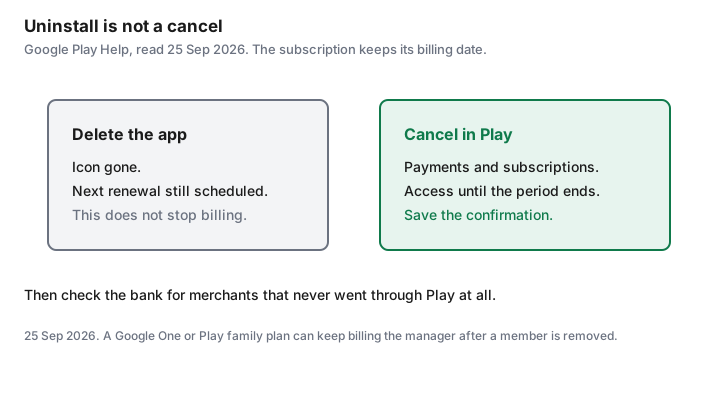
Uninstall myth: deleting the app does not stop billing
Google prints this as an “Important” line on the cancel article: when you uninstall an app, your subscription will not cancel. The home screen looks tidy. The renewal stays. People discover it on the statement, then assume the bank made an error, because the app is gone. It is not a bank error. It is an active subscription with no icon.
Reinstalling is not required to cancel. The subscriptions list does not need the app to be on the phone. If you already deleted it, go to the list anyway and cancel. If the app was removed from Play entirely, Google says future subscription charges are cancelled in that case, and past charges follow the refund policy. That is a store removal, not something you do by dragging an icon to the trash. Do not wait for Google to remove an app as your cancel plan.
Family Library / Google One shared plans that may still bill the manager
A shared plan has one payer. Google’s Canada One page says you can share eligible storage with up to five other people, and the person who subscribed is the one charged. Removing a family member, or turning off a sharing toggle, does not cancel that subscription. The manager’s Subscriptions list still shows Google One until the manager cancels it. Have the person download their files first. The pool will not follow them, and the free fallback is up to 15 GB total, including Gmail. That exit is the storage guide.
Play’s family library, if you use it, is about eligible purchases the family can download. It is not a second place where every subscription is cancelled. A YouTube or app subscription on a child’s Google Account is on that account’s list. Ask them to open Payments and subscriptions while you watch, the same way an Apple organizer cannot cancel another adult’s Apple Account. If you pay for a family group and also see a second Google One on a teen’s account, cancel the duplicate after you know which pool the photos use.
Cross-check bank statements for direct merchant names that never hit Play
Play’s list is complete only for charges Play made. A gym, a streaming site, Adobe, and Amazon bill on their own cards and will never appear here. Pull 90 days from the chequing account and the credit card, which is the statement hunt. Search for GOOGLE as well as for names you do recognise. A Google line might be Play, YouTube, or storage. Match the amount and the date to the subscription row. Anything with no matching row is a direct merchant. Cancel on that merchant’s site.
Canadian examples that belong on the sheet and not in Play: Amazon Prime at $9.99 a month or $99 a year before tax, from the fee page used 24 Sep 2026; Netflix when Netflix or a TV partner bills it; a GoodLife draft, which is ended with the club rather than by stopping the bank debit. Stopping a pre-authorized debit does not end the contract. That warning lives on the hidden-charges guide. Use it before you “just block Google” at the bank and leave the subscription active.
Set a Play renewal email filter so trial ends are visible
Play receipts arrive, and they are easy to treat as noise. In the inbox the household actually reads, filter messages about Google Play renewals and trial endings into a label both adults can see. Do not send them only to one person’s promotions tab. The filter is a net. The cancel is still the subscriptions list.
When a trial email arrives, open the subscription that day and read the renewal time. Cancel if you will not keep it. Then add a quarterly calendar event: “Open Play subscriptions on every Google Account on the family phones.” New trials show up between those dates, which is why the audit repeats. A charge after a saved confirmation is a support question with the screenshot attached, not a new subscription to ignore.
Sources & date stamps
- Google Play Help, “Cancel, pause, or change a subscription on Google Play,” read 25 Sep 2026: uninstalling does not cancel; cancel from the subscriptions list; access continues for time already paid; the 1 January to 31 December example; pause from one week to three months where the app allows it; payment-plan balances can remain; an authorization hold up to 48 hours before renewal; a missing subscription may be another account.
- Google One Canada about and plans pages, read 25 Sep 2026: share with up to five others; the subscriber is billed; free storage up to 15 GB is inside the paid total.
- Amazon Prime $9.99 or $99 before tax: fee page used 24 Sep 2026 on the Prime guide. It is not a Play subscription unless Play is the biller on the receipt.
Frequently asked questions
If I uninstall an Android app, does the subscription stop?
No. Google Play’s help page says that when you uninstall an app, the subscription will not cancel. Cancel in the Play subscriptions list for the Google Account that paid.
Do I lose access the moment I cancel?
Usually no. Google says you can keep using the subscription for the time you already paid. A yearly example on that page runs through the end of the year you bought. Read the date on your confirmation.
What is a pause?
Some apps let you pause payments, often for a week up to three months, starting at the end of the current period. A pause is not a cancel. Billing is set to resume. Cancel if you do not want it back.
The subscription is not in my Play list. Where is it?
It may be on another Google Account, or it may never have been billed by Play. Check every account on the phone, then the bank line. A merchant that bills you directly will not appear in Play.
Does removing a family member cancel Google One?
No. The manager is the person billed for a shared Google One plan. Remove the member only after they have downloaded their files, and cancel the plan itself in the manager’s subscriptions if nobody still needs the pool.