
Subscriptions · Canada
Share Cloud Storage Legally in Canada: Google One Family vs iCloud+ Family
Mixed-device families in Canada often pay Apple and Google for the same job: a copy of the photos. Each phone nags on its own, a parent taps the upgrade, and a second plan starts because nobody opened the first one. The legal share is a family pool the company already sells. The saving is cancelling the second paid tier after the files have somewhere to live.
iCloud+ prices below are Apple’s Canada table, published 16 Sep 2026. Google’s Canada plans page, read 25 Sep 2026, listed capacities and family sharing and did not print a CAD amount in the copy we could retrieve. A visitor in the United States sees US prices. Use the Canadian checkout. How to invite people into Apple’s group is the Family Sharing guide.
Disclosure: Cloud-storage plans are an offer type. Saving Optimizer may earn a commission if we later add a partner link. We do not currently claim a Google, Apple, or other storage partnership. Education only. No card rankings.
Key takeaways
- iCloud+ and eligible Google One plans can each be shared with up to five other people. You are sharing space, not inboxes or camera rolls.
- Apple lists 200 GB at $3.99 a month and 2 TB at $12.99. Divide by the people who store files, not by six empty seats. Google’s 200 GB tier is named on the Canada page; read the CAD price there before you compare.
- The free 15 GB is inside a Google One total, not added on top. Apple’s free tier, if you are not on iCloud+, is 5 GB.
- iPhones default toward iCloud. Android phones default toward Google Photos. Pay for the library you cannot replace. Keep the other side on the free tier if it fits.
- Download before you remove someone. The pool does not leave with them.
Who can be invited and how storage pools work on each platform
Apple’s iCloud+ pricing page says you can share each paid plan with up to five other family members. That is the organizer plus five, through Family Sharing. Members use the same home country. They do not have to share a street. Photos and files stay that person’s unless they share an album or a folder on purpose. The pool is one number for the group. If the group is on 200 GB, the group has 200 GB, not 200 GB each.
Google’s Canada about page says the same shape in different words. On the Basic plan and above you can share with up to five other people at no extra charge, six including the manager. Everyone gets their own space. Your content stays private. The plans page says every Google Account includes up to 15 GB, and that this free amount is included in the paid total. A household that upgrades is sharing one larger total across Gmail, Drive, and Google Photos, not six separate upgrades.
The manager pays on both systems. Removing a member does not automatically cancel the plan. Google also says some benefits stay with the plan manager, so do not assume every AI extra on a higher Google One plan appears on a teen’s account. Storage is the benefit this page is buying. If a feature matters, read that plan’s family column before you use it as a reason to upgrade.
CAD price tiers (200GB / 2TB class) and per-person effective cost
Apple prints Canada prices. Google, on the page we could read, prints Canada capacities. Compare them only after you have typed the Google CAD figure from your own checkout into the sheet. Do not convert a US price.
| Plan | Monthly price | Two people who store files | Six people who store files |
|---|---|---|---|
| iCloud+ 50 GB | $1.29 | $0.65 | $0.22 |
| iCloud+ 200 GB | $3.99 | $2.00 | $0.67 |
| iCloud+ 2 TB | $12.99 | $6.50 | $2.17 |
| iCloud+ 6 TB / 12 TB | $39.99 / $79.99 | Only if the library is that large | Same test |
| Google One 100 GB (Basic) and 200 GB (Standard) | CAD price on the Canada checkout | Checkout price ÷ 2 | Checkout price ÷ 6 |
| Larger Google One tiers on the Canada page | The page also lists 400 GB and multi-terabyte AI plans | Buy the tier that fits used storage, not the top row | Confirm which benefits the manager keeps |
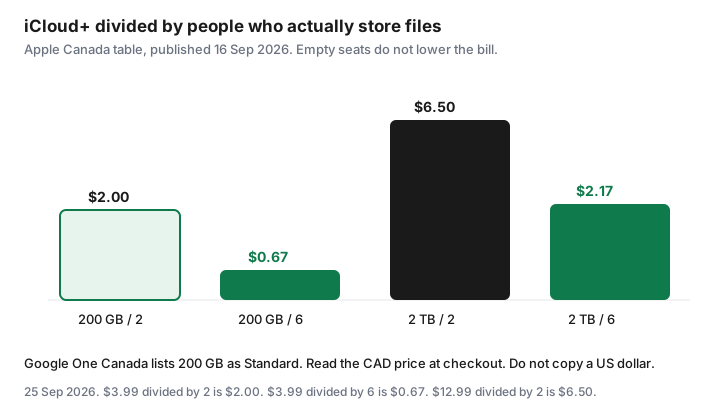
Effective cost is a planning number, not a discount. Apple still charges $3.99 if only one person uploads. Divide by the people who will store files this year. A 2 TB plan at $12.99 is $6.50 each for two heavy camera rolls, and it is a waste if the family’s iPhone backups total 40 GB. Check used space in iCloud settings and in Google One before you pick the tier. A third storage subscription, from any other brand, is a third bill. This page is the choice between the two pools the phones already ask for.
Apple One can wrap iCloud+ into a bundle. Family is $30.95 with 200 GB, Premier is $46.95 with 2 TB, on Apple’s Canada page read 25 Sep 2026. Use those prices only if you already want the other services in the bundle. The storage decision by itself is the iCloud+ row.
Photos backup realities: iPhone vs Android vs mixed households
An iPhone will offer iCloud Photos and an iCloud backup of the device. An Android phone will offer Google Photos and a Google backup. In a house with both, each parent taps the prompt on their own phone and the household buys both 200 GB-class plans. The photos are not in one place. They are in two places, and each place is only half the family.
Pick the pool that matches the phones holding the photos you would hate to lose. If the main camera is an iPhone and the Android phone is a work device with few personal photos, pay for iCloud+ and leave Google on the free 15 GB, which also has to hold Gmail. If the household is Android and one parent has an iPad for recipes, pay for Google One and keep the iPad inside 5 GB, or pay for the smallest iCloud+ tier only if the iPad backup will not fit. Write the choice down so the next “storage full” alert does not start a second plan.
Backups and photo libraries are different switches. Turning off iCloud Photos does not by itself delete a device backup, and the reverse is also true. When you downgrade, read the list of what is using space. A single phone backup can be larger than the camera roll. Delete old device backups you do not need before you decide the family needs 2 TB.
What is not shared (email quotas quirks, some paid features)
You are not sharing an inbox. Gmail on a member’s account still belongs to that account. What they share is the ceiling. A parent who never deletes mail can fill a family Google One plan and block a teen’s Photos backup. Look at storage by account before you blame the plan size. Apple’s iCloud Mail, photos, and device backups draw on the same shared iCloud+ number, and a large mail archive has the same effect.
Google’s free 15 GB is not a bonus on top of 200 GB. The Canada plans page says it is included in the paid total. Apple’s free 5 GB is what you have when you are not paying for iCloud+. Do not add the free tier to the paid tier in your head.
Feature gaps sit beside the space. Apple’s 50 GB plan supports HomeKit Secure Video for one camera, 200 GB for up to five cameras, and 2 TB and above for an unlimited number, on the pricing page. Private Relay and Hide My Email come with iCloud+. Aliases are still personal. On Google’s side, the about page says certain benefits are only for the manager. A higher tier bought “so the kids get the AI features” may not do that. Read the family column. App subscriptions, YouTube channel memberships, and a Google Play app trial are not the storage pool. Those show up in the Play subscriptions list.
Exit plan: download data before removing someone from the family group
Removing a person takes the shared space away from their account. It does not mail them a hard drive. Before the organizer removes them, or before they leave, they download what they need while the pool still covers them.
On Apple, they can download photos to the phone or to a computer while iCloud Photos is still available, and copy files out of iCloud Drive. Then look at the size. If it is over 5 GB, they need their own paid plan or a drive before the family pool drops them. On Google, they use the Google Takeout export or download from Photos and Drive, and they remember that Gmail counts toward the same 15 GB they will fall back to. A full mailbox plus a photo library will not fit. Do this before the remove button, not the week after, when the account is already over the free limit and syncing has stopped.
The same sequence applies when a teen moves out of Apple Family Sharing. The Family Sharing guide covers roles and the organizer’s card. This page only insists on the download. Put the files on a drive you already own. A new storage subscription on the way out of the old one is how the duplicate starts again.
Pick one ecosystem to avoid paying Google and Apple storage twice
The decision fits on one line in the household sheet. Primary pool: iCloud+ or Google One. Tier: the smallest plan that fits used space plus a year of photos. Who is invited: the people who will store files. Second pool: free tier, or cancelled. Review date: the same quarter as the subscription audit.
If both paid plans are already running, do not cancel the second one on the same afternoon you notice it. Export first, confirm the primary pool has the files, then cancel the duplicate in the place that bills you. Apple subscriptions cancel in Settings, your name, Subscriptions, at least a day before renewal for trials, as Apple’s cancel page published 14 Sep 2026 describes. Google One bought through Play cancels in the Play subscriptions list. Google One bought on the web cancels in the Google account that pays. Deleting a photos app does not cancel either plan.
Then stop the prompts from recreating the bill. On the phone that is supposed to stay free, turn off the paid-upgrade path you just cancelled and leave camera upload off, or point it at the free space only. Check the card next month for a second storage descriptor. That charge is the whole point of the quarterly pass.
Sources & date stamps
- Apple Support (CA), “iCloud+ plans and pricing,” published 16 Sep 2026: free tier 5 GB; Canada 50 GB $1.29, 200 GB $3.99, 2 TB $12.99, 6 TB $39.99, 12 TB $79.99; share with up to five others; HomeKit Secure Video camera counts by tier.
- Google One Canada plans and about pages, read 25 Sep 2026: up to 15 GB included inside paid totals; Basic 100 GB; Standard 200 GB; larger tiers listed; share with up to five others on eligible plans; content stays private; some benefits are manager-only. No CAD amount was in the copy retrieved. Do not use a US checkout as the Canadian price.
- Per-person iCloud+ figures are division: $3.99 / 2 = $2.00, $3.99 / 6 = $0.67, $12.99 / 2 = $6.50, $12.99 / 6 = $2.17. The plan price does not change when a seat is empty.
- Apple One Family $30.95 and Premier $46.95: Apple Canada Apple One page, read 25 Sep 2026.
Frequently asked questions
Does Google One add 200 GB on top of the free 15 GB?
Google’s Canada plans page says the free storage is included in the paid total. A 200 GB plan is 200 GB for Gmail, Drive, and Photos together, not 215 GB. iCloud+ plan sizes on Apple’s table are the plan’s storage, and the free tier if you are not subscribed is 5 GB.
Can six people share one iCloud+ plan?
Yes. Apple says each listed iCloud+ plan can be shared with up to five other family members, so six people in total, through Family Sharing. They must use the same home country. Files stay private unless someone shares them.
Why will this page not print a Google One CAD price?
Google’s Canada plans page listed capacities, including 200 GB, and said you can share with up to five other people. The copy retrieved on 25 Sep 2026 did not include a Canadian dollar amount, and a US visit shows US prices. Read the CAD total while signed in on one.google.com before you subscribe.
If I remove someone, do they keep the photos?
They keep what is stored in their own account only if it fits the storage they have left. Shared pool space does not go with them. Download before you remove them. Apple’s free tier is 5 GB. Google’s free tier is up to 15 GB total, including mail.
Should a mixed iPhone and Android house pay for both?
Usually no. Pay for the pool that holds the photos you cannot replace, and keep the other side on the free tier if it fits. Two paid plans is the duplicate this page is trying to stop.