
Technology · Canada
Phones and Plans for Aging Parents in Canada: Simple Devices, Low Plans and Scam Protection
In Canada, the best phone and plan for an aging parent is one they can use easily, that costs little to run, and that helps block scams. Match the device to their needs: a simple phone for calls, or a smartphone set up with larger text and a simplified home screen. Pick a plan for their real use, often low data, and check low-cost programs for seniors receiving the Guaranteed Income Supplement. Turn on call blocking and talk through common scams; report fraud to the Canadian Anti-Fraud Centre.
Key takeaways
- Device: simple phone for calls, or a smartphone with accessibility settings turned on.
- Plan: base it on real use; low-data and prepaid plans often fit.
- Low income: some carriers run plans for seniors receiving GIS, such as TELUS Mobility for Good for Seniors.
- Scams: turn on call filtering, never share one-time codes, and agree on a family check-in for urgent money requests.
- Report fraud to the Canadian Anti-Fraud Centre: 1-888-495-8501.
Choosing the device
| Type | Good for | Watch for |
|---|---|---|
| Simple or flip phone | Calls and texts, large buttons, long battery | Limited apps, video calls |
| Smartphone with accessibility settings | Video calls, photos, apps, maps | Setup time; scam exposure |
| Refurbished smartphone | Lower cost | Battery health and software updates |
On a smartphone, turn on larger text, bold text, a simplified home screen if offered, hearing aid compatibility, emergency SOS, and a medical ID with emergency contacts. Remove apps they do not need.
Choosing the plan
- Check their real usage for a month; many seniors need little data.
- Prepaid caps spending; postpaid allows autopay.
- Low-income programs: some carriers offer plans for seniors receiving GIS. Ask carriers and check eligibility and proof needed.
- Adding them to a family plan can lower the cost; remember the account holder is responsible.
Scam protection
- Turn on carrier and phone call-filtering or spam blocking.
- Never share a one-time code, banking PIN or password by phone or text.
- Grandparent scams: agree on a family code word and call back on a known number before sending money.
- Government agencies such as the CRA do not demand payment by gift card or cryptocurrency.
- Report fraud to the Canadian Anti-Fraud Centre at 1-888-495-8501 and to local police.
Step by step: setting up a phone for a parent
- Sit down together and ask what they want to do: calls, texts, photos of grandchildren, video calls, maps, banking. Let that decide the device.
- Turn on accessibility settings: larger and bold text, display zoom, higher contrast, louder ringtone and flash or vibration alerts, and hearing aid compatibility settings if they use hearing aids.
- Add the most-called people as favourites and photos to contacts, so a tap calls the right person.
- Set up emergency SOS and a medical ID with emergency contacts, medications and allergies, visible from the lock screen.
- Turn on automatic updates and a screen lock they can manage, such as a fingerprint or face unlock.
- Turn on call filtering or silence unknown callers, and block premium text messages if the carrier offers it.
- Write a one-page guide in their words for the three things they do most, and keep it with the phone.
Trial periods and accessibility rights
Under the CRTC Wireless Code, a person who self-identifies as having a disability gets an extended trial period of at least 30 days, with usage limits at least double the standard trial, on contracts with an early cancellation fee. That gives more time to test whether a device and plan work for someone with low vision, hearing loss or limited dexterity. Many carriers also have accessibility support teams and plans; ask about them.
Who manages the account
| Setup | How it works | Consider |
|---|---|---|
| Parent's own account | They hold the account; you help | They keep control; you need their permission to call the carrier |
| Authorized user on their account | You can discuss the account with the carrier | Ask the carrier how to add an authorized user |
| Line on your family plan | You are the account holder | You are responsible for charges; they depend on you to manage it |
Common scams aimed at seniors
- Grandparent or emergency scam: a caller claims a grandchild is in trouble and needs money urgently, often asking for secrecy.
- Government impersonation: a caller claims to be from the CRA, Service Canada or police and demands payment or personal information.
- Bank investigator scam: a caller claims to be from the bank's fraud team and asks for a card, PIN or transfer to a 'safe' account.
- Tech support scam: a pop-up or call claims the device is infected and asks for remote access or payment.
- Prize or lottery scam: a fee is needed to release winnings.
The common thread is urgency and secrecy. Agree on a rule: no money moves and no codes are shared until they have hung up and called a family member or the bank on a known number.
Common mistakes
- Buying the most capable phone when a simple one fits their needs.
- Choosing a large data plan for someone who uses Wi-Fi at home.
- Skipping the setup visit; most frustration comes from settings, not the device.
- Leaving voicemail unset, so missed calls from doctors and family go nowhere.
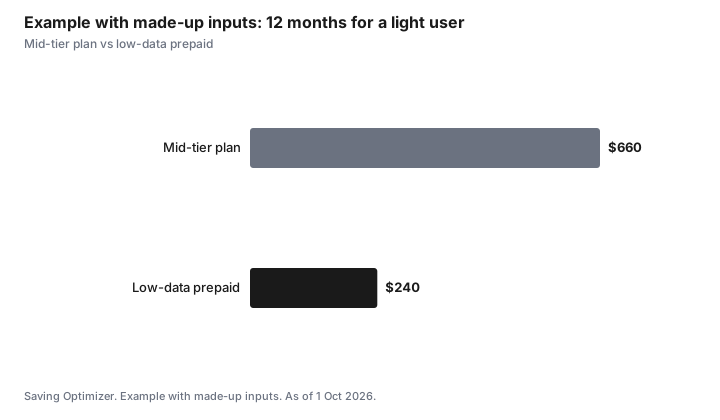
Example with made-up inputs: yearly cost
These numbers are an example with made-up inputs, not current prices.
| Option | Monthly | 12 months |
|---|---|---|
| Mid-tier smartphone plan | $55 | $660 |
| Low-data prepaid | $20 | $240 |
Sources
- TELUS, Mobility for Good for Seniors, as of 1 Oct 2026. Plans for seniors receiving the Guaranteed Income Supplement; eligibility proof required.
- Canadian Anti-Fraud Centre, reporting fraud, as of 1 Oct 2026. 1-888-495-8501.
- CRTC, The Wireless Code, as of 1 Oct 2026. Extended trial of at least 30 days with at least double usage limits for customers who self-identify as having a disability.
- The prices in the example table and chart are made-up inputs.
Frequently asked questions
What phone is best for an elderly parent in Canada?
One they can use easily. A simple phone suits calls and texts; a smartphone with larger text and a simplified home screen suits video calls and photos.
Are there cheap phone plans for seniors in Canada?
Some carriers offer low-cost plans for seniors receiving the Guaranteed Income Supplement, such as TELUS Mobility for Good for Seniors. Low-data prepaid plans also fit light users.
How can I protect a parent from phone scams?
Turn on call filtering, agree never to share one-time codes, use a family code word for urgent money requests, and call back on a known number.
Where do I report a phone scam in Canada?
To the Canadian Anti-Fraud Centre at 1-888-495-8501, and to local police if money was lost.
Should I add my parent to my family plan?
It can lower the cost, but the account holder is responsible for all lines. Compare with a separate low-cost plan.
Is there a longer trial period for people with disabilities?
Yes. Under the Wireless Code, a person who self-identifies as having a disability gets a trial period of at least 30 days, with usage limits at least double the standard trial, on contracts with an early cancellation fee.
What scams target seniors by phone?
Common ones include grandparent or emergency scams, government impersonation, fake bank investigators, tech support scams and prize scams. Urgency and secrecy are the warning signs.
Researched and drafted with AI assistance and fact-checked against official Canadian sources. How we create content.
Disclosure: TELUS Mobility for Good for Seniors is named as a low-income program, not a partner or recommendation; other carriers and devices are described as offer types and not ranked. Saving Optimizer may earn a commission if a partner link is added later; no partnership is claimed. Education only.