
Subscriptions · Canada
iCloud Storage Full in Canada: Upgrade, Clean Up, or Switch—A Cost Framework
The iPhone says storage is full, and the button in front of you is an upgrade. That button is a monthly subscription. Apple’s Canada price table, published 16 September 2026, starts at $1.29 for 50 GB and reaches $12.99 for 2 TB. The free plan is 5 GB. Most “full” warnings are the free plan, or a 50 GB plan that filled with backups and message attachments, not a family that needs 2 TB tomorrow. Clean up first. Then decide whether one shared plan is cheaper than five separate ones. Then decide whether the photos even belong in iCloud.
If the household is mixed Apple and Android, the comparison is the Google One versus iCloud guide. Leaving Google later has its own steps on the downgrade guide.
Disclosure: External SSDs, backup drives, and cloud-plan checkouts are offer types. Saving Optimizer may earn a commission if we later add a partner link. We do not currently claim an Apple, drive, or cloud partnership. Prices are Apple’s published Canada figures unless labelled. Education only.
Key takeaways
- Apple’s Canada table, published 16 Sep 2026: 50 GB $1.29, 200 GB $3.99, 2 TB $12.99, 6 TB $39.99, 12 TB $79.99 a month. Free iCloud is 5 GB.
- 200 GB shared by a household is a small pool. 2 TB is the tier that gives a family room, at $155.88 over twelve months.
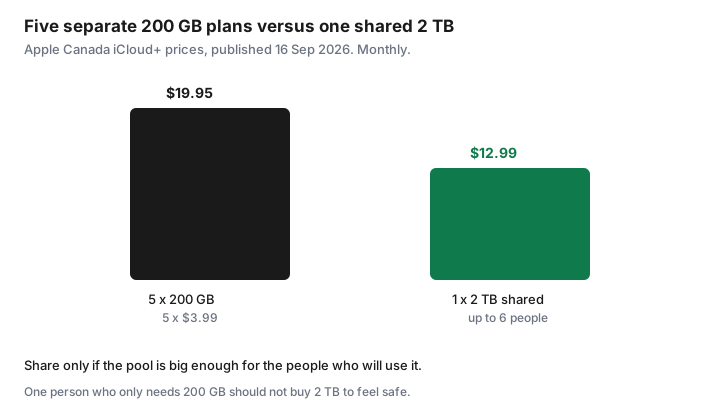
- Five separate 200 GB plans are 5 × $3.99 = $19.95 a month. One shared 2 TB plan is $12.99, if the pool fits everyone.
- Delete old device backups, large message attachments, and oversized WhatsApp media before you upgrade.
- iCloud is one copy. A 3-2-1 set still needs another copy outside that account.
CAD iCloud+ tiers and what 200GB vs 2TB actually buy a family
Apple Support, “iCloud+ plans and pricing,” published 16 September 2026, lists Canada in Canadian dollars: 50 GB $1.29, 200 GB $3.99, 2 TB $12.99, 6 TB $39.99, 12 TB $79.99, billed monthly. The same page says you can share any of those plans with up to five other family members. Apple’s Canada iCloud marketing page shows the same monthly figures and says the free starting point, the first time you sign in on an iPhone, iPad, or Mac, is 5 GB. The Canada row on the price table does not carry the footnote Apple uses when tax is included. Read the upgrade screen for tax.
| Plan | Monthly | Twelve months | If six people split it evenly |
|---|---|---|---|
| Free | $0 | $0 | 5 GB each, not pooled |
| 50 GB | $1.29 | $15.48 | About 8 GB each |
| 200 GB | $3.99 | $47.88 | About 33 GB each |
| 2 TB | $12.99 | $155.88 | About 341 GB each |
| 6 TB | $39.99 | $479.88 | About 1 TB each |
200 GB is a real upgrade from 5 GB for one person or a couple who do not shoot much video. Split six ways it is about 33 GB each, which is a thin photo library plus a phone backup. 2 TB is the family tier on this table: video, a couple of phone backups, and iCloud Drive, without jumping to the $39.99 plan. Twelve months of 2 TB is $155.88 before whatever tax the screen adds. That is the number to put next to Microsoft 365 Family at $145 a year, which includes 1 TB of OneDrive per person and the Office apps, on the Family plan guide. Buy 2 TB of iCloud because you need Apple’s photo library and device backup. Do not buy it because the warning was red.
Apple’s Canada page also says iCloud+ is included in Apple One plans, and that you can add a separate iCloud+ plan on top for more storage. Open the subscriptions list before you add a second storage charge. If Apple One already includes a tier large enough, the upgrade button is a duplicate.
Cleanup first: Large Attachments, old device backups, WhatsApp media
On an iPhone, open Settings, your name, iCloud, then the storage screen Apple labels Manage Account Storage or a close variant. The categories that usually explain a full 5 GB or 50 GB plan are Backups, Photos, and Messages. Delete backups for devices you no longer own. A drawer iPad from 2019 can be a multi-gigabyte backup you will never restore. Keep the backup of the phone you are using.
Messages stores large attachments in iCloud when Messages in iCloud is on. Apple’s storage screen groups these so you can review them. Delete the video threads you do not need. Photos has a Recently Deleted album that holds items for 30 days. Empty it if you meant the deletion. None of this requires a new tier.
WhatsApp media is a common hidden pile. WhatsApp keeps photos and videos on the device, and an iCloud backup of the phone, or WhatsApp’s own iCloud backup, can include that library. In WhatsApp, Storage and data shows large chats. Chat backup settings control whether videos are included. Clearing a chat’s media does not delete the conversation text if you choose media only. Do this before you pay $12.99 a month to back up a group chat from 2022. If the cleanup drops you under the current plan, stop. Set a reminder to look again in three months. The upgrade can wait.
Family Sharing one upgrade vs five Individual upgrades
One person pays for the iCloud+ plan and shares it in Family Sharing. Apple says each person’s files stay separate. The storage is a pool. Five adults each buying 200 GB pay 5 × $3.99 = $19.95 a month and get 200 GB each, 1 TB in total, but in five silos. One 2 TB plan at $12.99 is $6.96 a month less, $83.52 over a year, and the pool is twice as large as those five silos combined. That trade is worth it when several people are actually near 200 GB. It is a bad trade when four of the five people would have stayed on the free 5 GB.
Five separate 50 GB plans are 5 × $1.29 = $6.45 a month for 250 GB in silos. One shared 200 GB plan is $3.99 for a smaller pool. Cheaper, and tighter. If each person needs their own 50 GB and will not share a pool, the five cheap plans can be the right shape. Write the names of the people who will turn sharing on. An invitation nobody accepts is not a family plan. It is one person paying for 2 TB.
The organizer’s payment method is the subscription. When that person leaves the family group, the others drop back toward their own 5 GB unless someone else buys a plan. Tell the household that before you consolidate. Downgrade only after you know the pool still fits, in the next section.
When Google Photos / OneDrive is a better fit for mixed devices
iCloud device backup restores an iPhone: apps, settings, and the Apple photo library. It does not help an Android phone in the same kitchen. Google Photos is the cross-platform library. A Canada-priced Google One view captured 25 Sep 2026 listed Basic 100 GB at CA$2.79 a month and Google AI Plus 2 TB at CA$13.99 a month, shared with up to five other people, with Gmail and Drive in the same quota. If half the household cannot sign in to iCloud, paying for 2 TB of iCloud so the Android photos “have a place” does not give them a place. Use the pick-one guide.
OneDrive fits when you already pay for Microsoft 365. Family includes 1 TB per person, up to six people, at $145 a year on the Canada store page fetched 25 Sep 2026. That is storage plus Word. It is not an iPhone backup. Do not cancel iCloud backup because OneDrive holds documents, unless you have another way to restore the phone. Photos can move. A full device backup is a different job.
Cancel or downgrade path after liberating space
After the cleanup, if you are under 5 GB, you can cancel iCloud+ and return to the free plan. If you are under 200 GB and you are on 2 TB, downgrade to 200 GB. On the iPhone the control is in the same iCloud storage screen: Change Storage Plan, then the downgrade options Apple shows. Apple’s pricing page says that after you upgrade you are billed monthly. A downgrade applies on the billing cycle the screen describes. Read that date. Do not assume the lower price starts tonight.
If you are still over the lower tier, Photos and new backups will not keep filling. Free space until the screen says you fit, or stay on the tier that fits. Cancelling while you are over 5 GB is how people discover, a month later, that photos stopped uploading. The Google version of that mistake is documented on the Google One cancel guide. The Apple version is the same idea: be under the plan you are moving to before you need it.
Put the monthly anniversary on the renewal calendar with a 7-day reminder to recheck storage. iCloud has no annual prepay on this price table, so the “annual” saving does not exist. The saving is the tier you did not buy.
3-2-1 backup note: cloud is not your only copy of irreplaceable photos
Three copies, on two kinds of storage, with one copy somewhere else. iCloud is one copy, in one account, behind one Apple ID. A fire, a locked account, or a downgrade that stops uploads does not care that you paid $12.99. Keep a second copy on a drive in the house, and a third that is not that drive and not only iCloud. An external SSD is an offer type if you need to buy one. A drive you already own is the same method. Copy the irreplaceable years, check that a few files open, and store that drive away from the laptop.
Shared albums and a Shared Photo Library are convenient. They are still inside iCloud. They are not the offsite copy. Once a year, in the January hour, confirm the drive copy is newer than the last big trip. Then decide the tier again. The cap for all of this, including the drive you do not need to replace every year, sits on the household cap.
Sources & date stamps
- Apple Support (CA), “iCloud+ plans and pricing,” published 16 Sep 2026: Canada 50 GB $1.29, 200 GB $3.99, 2 TB $12.99, 6 TB $39.99, 12 TB $79.99 a month. Share with up to five other family members. Free tier described as 5 GB.
- Apple Canada iCloud page, read 25 Sep 2026: same monthly prices; free 5 GB on first sign-in; iCloud+ included with Apple One; sharing keeps files separate.
- Microsoft Canada store, 25 Sep 2026: Family $145 a year, 1 TB OneDrive per person. Google One Canada-priced view, 25 Sep 2026: 100 GB CA$2.79 a month, 2 TB CA$13.99 a month. Confirm currency on the Google screen.
- The even-split gigabytes and the five-plan total ($19.95) are arithmetic on those Apple prices, not a quote from Apple.
Frequently asked questions
How much is iCloud+ in Canada?
Apple’s Canada table published 16 Sep 2026 lists 50 GB at $1.29, 200 GB at $3.99, 2 TB at $12.99, 6 TB at $39.99, and 12 TB at $79.99 a month. The free plan is 5 GB. Confirm tax on the upgrade screen.
Is 200 GB enough for a family?
Shared six ways it is about 33 GB each. That is tight once video and phone backups are in the pool. 2 TB is about 341 GB each on the same even split, at $12.99 a month.
Should each person buy their own 200 GB plan?
Five plans at $3.99 are $19.95 a month. One shared 2 TB plan is $12.99. Share when those people need the space. If they would have stayed on the free 5 GB, do not buy 2 TB for empty invitations.
I cleaned up. How do I downgrade?
Use Change Storage Plan on the iCloud storage screen and pick the lower tier only when your used space fits under it. Read the date the new price starts. Cancelling while you are over 5 GB stops new uploads.
Is iCloud a full backup of my photos?
It is one copy. Keep another copy on a drive, and a third that is not only that drive and not only iCloud. An external drive is an offer type if you need to buy one.