
Technology · Canada
Smart Home Devices in Canada: Hidden Subscription Costs and Privacy Trade-Offs
In Canada, the real cost of many smart home devices is the device plus the subscription. Security cameras and video doorbells often need a monthly plan to save video history or unlock features, and professional alarm monitoring is a separate monthly fee. Compare devices on a three-year total, and look for local storage options that avoid a plan. There is also a privacy cost: these devices collect video, audio and usage data, so read what is collected, change default passwords, turn on two-factor authentication and keep firmware updated.
Key takeaways
- Three-year cost = device + 36 months of any subscription.
- Check which features need a plan: video history, person detection, multiple cameras.
- Local storage (memory card or home hub) can avoid a cloud plan.
- Privacy: change default passwords, use two-factor authentication, update firmware.
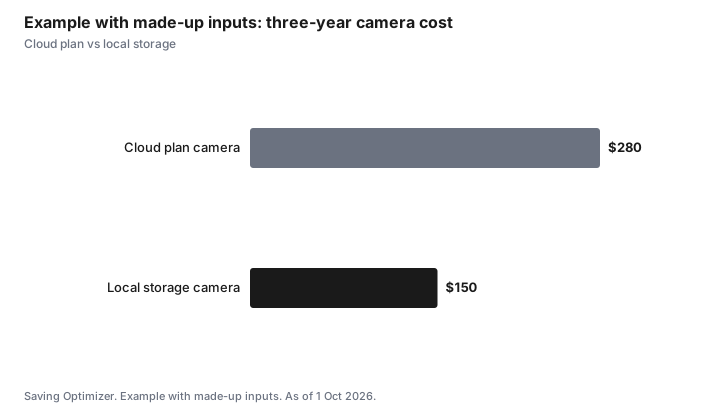
- Example with made-up inputs: $100 camera + $5 × 36 = $280 vs $150 with local storage.
Where subscriptions hide
| Device | What may need a plan | No-plan alternative |
|---|---|---|
| Security camera | Cloud video history, smart alerts | Local storage on a card or hub |
| Video doorbell | Recorded clips, package alerts | Live view only, or local storage models |
| Alarm system | Professional monitoring | Self-monitoring through an app |
| Smart speaker or display | Music or premium services | Free tiers |
| Smart thermostat | Usually none | Check for utility rebates |
Privacy trade-offs
- Read the privacy policy: what data is collected, where it is stored, and who it is shared with.
- Change default passwords and use two-factor authentication on the account.
- Keep firmware and apps updated.
- Point cameras at your own property; avoid recording neighbours' yards or windows.
- Turn off features you do not use, such as always-on microphones.
- The Office of the Privacy Commissioner of Canada publishes guidance on smart devices.
Before you buy
- Check whether the device works without the app maker's cloud if the company stops support.
- Check what happens if you cancel the plan.
- Look for utility rebates on smart thermostats.
- Renters: check the lease before mounting devices.
Step by step: securing a new smart device
- Before buying, check the maker's privacy policy and how long it promises security updates.
- Set up the device on your home Wi-Fi with a strong router password; if your router supports a guest or separate network, use it for smart devices.
- Create a unique, strong password for the device account and turn on two-factor authentication.
- Review default settings: turn off features you do not need, such as audio recording, location history or sharing with third parties.
- Set privacy zones on cameras to mask neighbours' windows and yards.
- Turn on automatic firmware updates.
- When you sell or dispose of a device, factory reset it and remove it from your account.
Canadian privacy law in brief
Private companies that collect personal information in the course of commercial activity in Canada are generally covered by the federal Personal Information Protection and Electronic Documents Act (PIPEDA). Quebec, British Columbia and Alberta have their own private-sector privacy laws that apply instead in many cases. Under these laws, companies must get meaningful consent and limit what they collect. You can ask a company what personal information it holds about you. If you have a complaint, the Office of the Privacy Commissioner of Canada or your provincial commissioner handles it.
| Situation | Who to contact |
|---|---|
| A company's handling of your data, in most provinces | Office of the Privacy Commissioner of Canada |
| A company operating in Quebec, BC or Alberta, in many cases | The provincial privacy commissioner |
| A neighbour's camera recording your property | Talk to the neighbour first; then your municipality or local options |
Cancelling or downgrading a plan
Before cancelling a camera or alarm subscription, download any video you want to keep, since cloud history is usually deleted. Check whether the device still records locally or offers live view without a plan. For alarm monitoring contracts, read the term and cancellation clause; some run for a fixed period with a fee to end early. Provincial consumer protection laws may give you rights on certain contracts; check your province.
Example with made-up inputs: a multi-camera setup
These numbers are an example with made-up inputs. A household wants three cameras. A brand charges $5 a month per camera or $12 a month for unlimited cameras. Over 36 months, three per-camera plans cost $540 and the unlimited plan $432. A local-storage hub at $150 plus three local cameras avoids the plan entirely.
Common mistakes
- Buying several cameras without pricing the plan for multiple devices.
- Leaving the default password or skipping two-factor authentication.
- Forgetting to factory reset a device before selling it, leaving it linked to your account.
- Placing indoor cameras where they record guests or caregivers without telling them.
- Assuming a device will be supported forever; check the update commitment.
Example with made-up inputs: three years
These numbers are an example with made-up inputs, not current prices.
| Option | Device | Plan (36 months) | Total |
|---|---|---|---|
| Cloud plan camera | $100 | $5 × 36 = $180 | $280 |
| Local storage camera | $150 | $0 | $150 |
Sources
- Office of the Privacy Commissioner of Canada, guidance on smart devices and home cameras, as of 1 Oct 2026.
- Office of the Privacy Commissioner of Canada, PIPEDA and provincial private-sector privacy laws (Quebec, British Columbia, Alberta), as of 1 Oct 2026.
- The prices in the example table and chart are made-up inputs.
Frequently asked questions
Do smart cameras need a subscription in Canada?
Many need a plan for cloud video history and some smart features. Some models offer local storage that avoids a plan.
How do I compare smart home costs?
Add the device price to 36 months of any subscription and compare the three-year totals.
Are smart home devices a privacy risk?
They collect video, audio and usage data. Read the privacy policy, change default passwords, use two-factor authentication and keep firmware updated.
Can I record my neighbours with a doorbell camera?
Point cameras at your own property and avoid recording neighbours' private spaces. The Office of the Privacy Commissioner has guidance.
What if the company stops supporting my device?
Some devices stop working without the maker's cloud. Check this before buying.
Which privacy law covers smart device companies in Canada?
PIPEDA generally covers private companies' commercial activity, while Quebec, British Columbia and Alberta have their own private-sector privacy laws that apply in many cases.
What should I do before cancelling a camera subscription?
Download any video you want to keep, since cloud history is usually deleted, and check what the device can still do without a plan.
Is a per-camera or unlimited camera plan cheaper?
It depends on how many cameras you have. Multiply each plan by 36 months for the number of cameras you plan to use.
Do smart devices keep working if the company stops supporting them?
Not always. Some depend on the maker's cloud service. Check the update commitment and whether the device works locally before buying.
Should smart devices be on a separate Wi-Fi network?
If your router supports a guest or separate network, putting smart devices on it can limit what an exposed device could reach.
Researched and drafted with AI assistance and fact-checked against official Canadian sources. How we create content.
Disclosure: Smart home devices and plans are described as offer types; none is named or ranked. The Office of the Privacy Commissioner is named as a public body, not a partner. Saving Optimizer may earn a commission if a partner link is added later; no partnership is claimed. Education only.